
How to Transcribe Videos With AI: A Beginner's Guide
Discover a streamlined video-to-text workflow using DeepScribe. Learn to upload, transcribe, clean, label speakers, and export subtitles efficiently.

DeepScribe Team
Content Team
How to Transcribe Videos With AI: A Beginner's Guide
Subtitled videos boast a 91% completion rate compared to just 66% for those without subtitles, and they can increase views by 12%. In today's digital landscape, having a robust transcription workflow is no longer a luxury; it's a necessity. Welcome to your beginner's guide to video transcription, where we'll transform your MP4 files into polished transcripts and subtitles effortlessly using DeepScribe. In just 10 minutes, you'll learn how to efficiently go from video to text, adding speaker labels and exporting clean SRT/VTT subtitles. Whether you're a YouTuber, video editor, or part of a media team, this guide promises a copy/paste-ready workflow tailored for creators and scalable for teams. Get ready to boost your content's accessibility, SEO, and engagement, while embracing the operational must-haves of AI-powered transcription.
Introduction: Why Transcription and Subtitles Matter
If you've ever wondered why subtitles in videos are such a big deal, here's a quick insight: subtitled videos boast a 91% completion rate, compared to just 66% for those without subtitles. That's quite significant! This means viewers are more likely to stick around to the end when captions are present, thanks to enhanced accessibility and clarity. For content creators, especially YouTubers or media teams, this directly translates to better viewer retention and engagement, which are crucial metrics in the digital content ecosystem.
But that's not all. Another compelling reason to integrate subtitles is the potential boost in visibility. Videos with subtitles can see an increase in views by up to 12%. This happens because subtitles make your content accessible to non-native speakers and those with hearing impairments, broadening your audience. Additionally, subtitles improve SEO since the text can be indexed by search engines, making your content more discoverable. If you're aiming for growth, these numbers are hard to ignore.
Transcription in the Modern Workflow
The days of manual transcription are largely behind us, thanks to cutting-edge AI technologies. AI-powered transcription tools have quickly shifted from a convenient luxury to an operational necessity. This shift is mirrored in the remarkable growth of the AI transcription market. One such tool, DeepScribe, offers a robust platform to convert audio and video content into text seamlessly. Features like speaker detection and the ability to handle various formats make it a desirable choice for creators and media teams. When tools like DeepScribe can transcribe content with high accuracy and speed, the workflow for creating publish-ready captions is streamlined.
The Workflow Advantage
Adopting a structured transcription-to-subtitle workflow is no longer optional. Imagine uploading an MP4, and within minutes, receiving a clean, speaker-labeled transcript ready for subtitle export. This process not only saves time but also enhances the quality and accessibility of your content. Tools like DeepScribe cater precisely to these needs, offering services tailored to both solo creators and larger media teams, ensuring that content is not only accurate but delivered swiftly.
To sum up, integrating transcription and subtitles into your video content strategy is a powerful move. It elevates viewer engagement, expands accessibility, and boosts your SEO efforts. With the right tools and workflow, such as those provided by DeepScribe, you're well-equipped to leverage these benefits for substantial growth in your audience reach and content effectiveness.
The Beginner-Friendly Guide to Video Transcription: Workflow Overview
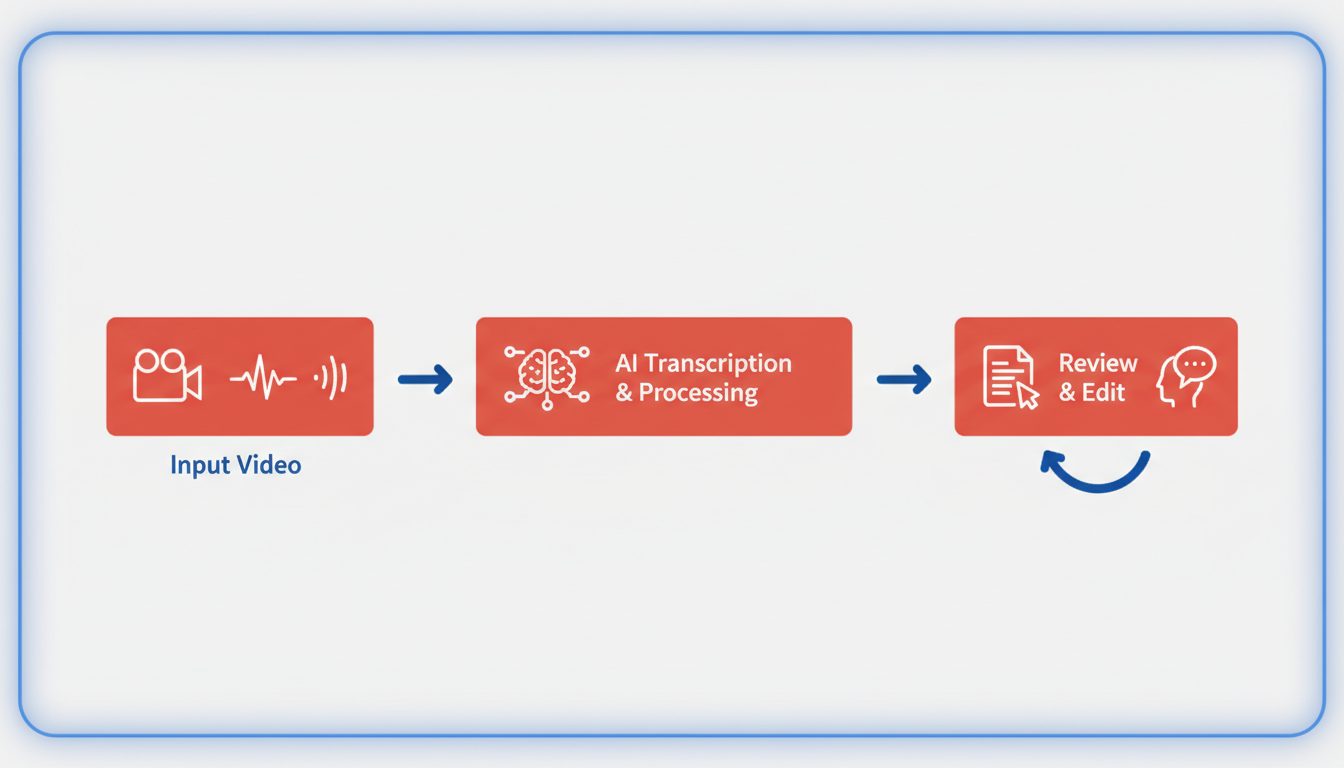
Let's dive into the comprehensive video to text workflow that turns your video content into accurate transcripts, ready-to-use subtitles, and more. Whether you're a solo YouTuber or part of a media team, this guide makes transcription manageable with DeepScribe. Here's how it works:
Upload MP4: Start by uploading your MP4 video to DeepScribe. Thanks to its Whisper-powered AI, you can handle various formats and benefit from improved accuracy and speed, turning the transcription process into a breeze.
Transcribe: Once uploaded, DeepScribe transcribes the audio to text swiftly. This AI-driven process achieves up to 99% accuracy, handling accents and background noise effortlessly, ensuring you spend less time correcting errors.
Clean for Readability: After transcription, you'll want to clean up the text. This means correcting any misheard words and ensuring proper punctuation and structure. A transcript’s readability is crucial, especially if you're planning to use it for SEO or content repurposing.
Label Speakers: Adding speaker labels is an essential step, particularly for interviews or podcasts. DeepScribe's speaker detection automatically identifies different speakers, letting you clearly attribute quotes and maintain a coherent narrative.
Export SRT/VTT: Finally, export your work as SRT or VTT files. These formats are critical for video accessibility and can directly boost your video completion and view rates by 12% as users engage more with subtitled content (Rev). Choosing between SRT and VTT depends on your platform needs—SRT is more widely used, while VTT offers more styling options.
This end-to-end production pipeline transforms video transcription from a cumbersome task into a streamlined process. It's not just about getting a transcript; it’s a system that improves completion rates and maximizes video engagement.
By implementing this workflow, not only do you enhance accessibility and reach, but you also prepare your content for repurposing across different media formats. This applies whether you’re generating captions or turning transcripts into new blog posts, ensuring that every piece of content works harder and smarter.
Step-by-Step Tutorial: Using DeepScribe for Transcription
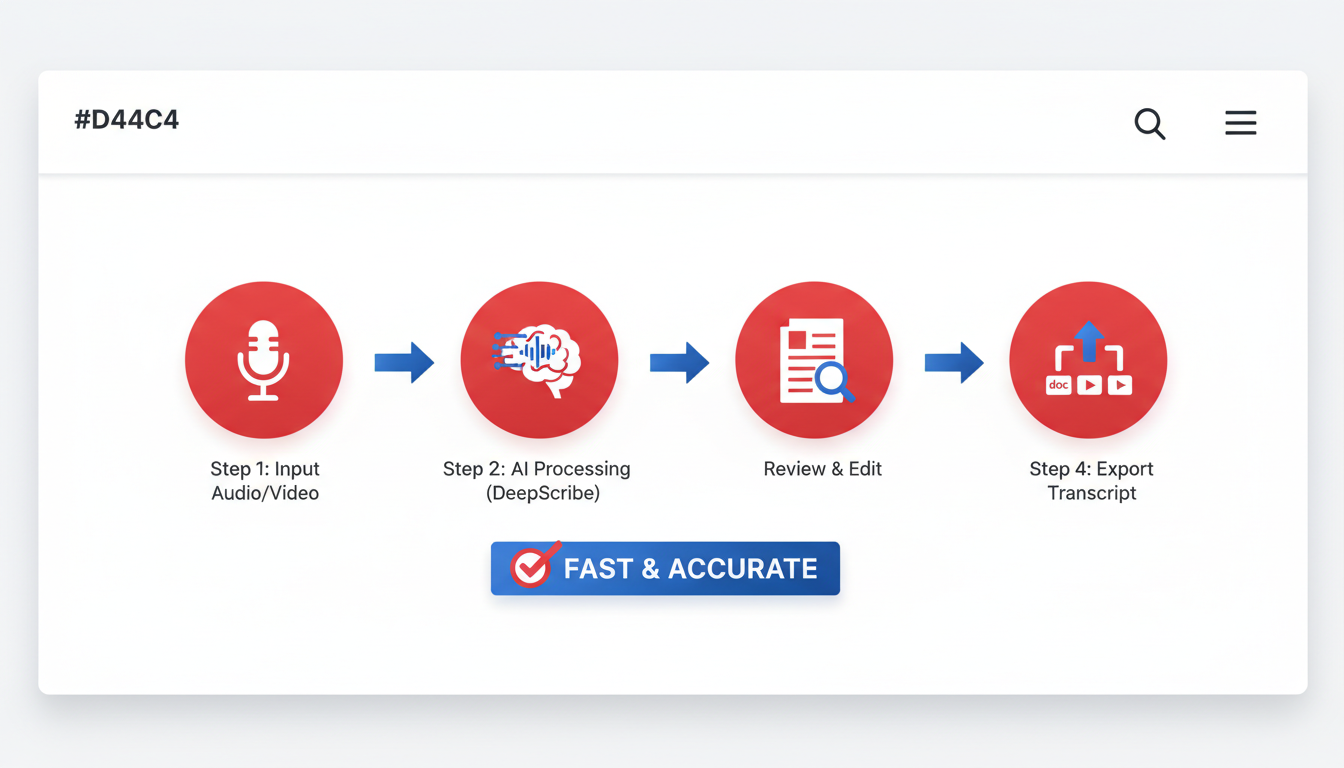
So, you're ready to dive into the world of AI-powered video transcription with DeepScribe. Whether you're a YouTuber looking to enhance viewer engagement or part of a media team seeking efficient workflows, this guide will walk you through the process. Let’s unpack how DeepScribe transforms your MP4 videos into clean, readable transcripts and subtitle files that boost accessibility and SEO. Here’s the promise: From upload to subtitle export, we’ll cover everything you need to know to make DeepScribe work seamlessly for your projects.
Uploading Your MP4 to DeepScribe
BLUF: Start by uploading your MP4 file to DeepScribe to kick off the transcription process.
The first step in this journey is uploading your video file. DeepScribe supports a myriad of formats like MP3, MP4, WAV, M4A, and more, making it versatile for various creator needs.
Navigate to the DeepScribe Dashboard: Log into your DeepScribe account. If you’re new, creating an account is simple and doesn’t require a credit card for a trial—perfect for testing the waters.
Upload Your File: Use the drag-and-drop functionality or click to select your MP4 file from your device. The platform accepts multiple formats, but MP4 is a common choice for video creators.
Automatic Language Detection: DeepScribe’s auto language detection analyzes your video to prepare it for precise transcription. This feature is particularly helpful for global teams working with multilingual content.
Pro Tip: Ensure your video has clear audio—reduce background noise for better transcription accuracy. Most AI platforms can handle some noise, but clarity improves outcome.
Receiving a Raw Transcript Quickly
BLUF: DeepScribe provides a raw, time-stamped transcript in minutes, enabling rapid content processing.
Once your file is uploaded, DeepScribe uses Whisper’s AI engine to produce a transcript quickly. This engine is celebrated for up to 99% accuracy, offering near-human reliability (per AssemblyAI), even in challenging audio conditions.
Processing Time: DeepScribe’s parallel processing can handle vast amounts of data simultaneously, giving you the transcript in a fraction of the recording time. This is crucial for creators dealing with long-form content like webinars or podcasts.
Initial Review: Upon completion, download your raw transcript. It appears with time stamps, making it easier to follow along with the video.
Cleaning the Transcript for Readability and Accuracy
BLUF: Edit the AI-generated transcript to enhance readability and ensure it aligns accurately with spoken words.
Why Clean the Transcript?
AI transcription is fast, but human oversight ensures context and flow, especially for speaker-dependent scenarios. Here's how to polish your transcript:
Read Through Once: Familiarize yourself with the general flow. Mark areas where context seems lost or sentences feel disjointed.
Timestamp Editing: Adjust timestamps for precision. While DeepScribe’s AI does a robust job, nuanced checks ensure subtitles sync perfectly with speech.
Language and Tone Improvements: Ensure technical terms and names are correctly spelled. AI might misinterpret jargon, so keep a glossary handy if your industry uses niche terminology.
Speaker Labeling: Assign accurate labels to different speakers. DeepScribe highlights speakers automatically, but confirm identities for interviews or panel discussions to avoid misattribution.
Adding and Verifying Speaker Labels
BLUF: Correctly label speakers for clarity, particularly in multi-speaker scenarios like interviews.
DeepScribe's speaker detection is a lifesaver for podcasts or interviews, where differentiating who says what is crucial. Here’s how to refine this:
Double-Check AI Assignments: The AI labels speakers, but your discerning eye ensures accuracy. Verify against the video, especially in dynamic discussions.
Manual Adjustments: If DeepScribe misidentifies a speaker, use the interface to adjust labels manually. This is a straightforward process that involves right-clicking the label and selecting the correct speaker.
Format for Readability: Present each speaker clearly, using consistent naming conventions to streamline the reading experience. For scripted content, this enhances the visibility of each character’s narrative.
Exporting Subtitle-Ready Files (SRT/VTT)
BLUF: Export subtitle files in SRT or VTT formats to improve video accessibility and engagement.
Subtitles have a notable impact: they enhance viewer retention and accessibility, increasing video completion rates by up to 91% compared to 66% without subtitles (Rev).
Steps to Export:
Choose Your Format: DeepScribe allows you to export in multiple popular formats. For simple subtitle needs, SRT is the go-to. Choose VTT if you need more formatting capabilities, such as text styling.
Check Subtitle Timing: Before exporting, ensure that the subtitle timing aligns perfectly with speech. Misaligned subtitles can distract viewers.
Review for SEO Benefits: Properly timed and labeled subtitles contribute to SEO, helping your content appear in more search results.
The Key Takeaway
Subtitles and accurate transcriptions aren't merely add-ons; they are central to your content strategy. As our digital habits evolve, so must our tools and workflows. With DeepScribe, the transition from MP4 to published caption is seamless, efficient, and impactful. By consistently applying these steps, you ensure higher engagement, accessibility, and content adaptability with each upload. Whether you're a solo creator or part of a larger media operation, DeepScribe equips you to lead in the content space—efficiently and expertly.
By integrating these steps into your content workflow, you’re not just transcribing your video into text; you're unlocking the potential to reach a broader audience and increase engagement. Happy transcribing with DeepScribe!
Accuracy and Quality Control: From Raw Output to Publishable Transcript
When it comes to transforming your video into a polished text format, ensuring video transcription accuracy is paramount. Achieving this involves a series of meticulous steps, from audio preparation to final transcript cleanup. Here's how you can turn raw AI-generated transcripts into publishable material with DeepScribe, your go-to tool for high-quality transcription.
Step 1: Audio Preparation
The foundation of a great transcript lies in pristine audio quality. Start by ensuring that your audio is as clear as possible:
- Minimize Background Noise: Use a quiet environment, or employ software tools to reduce background interference.
- Consistent Microphone Use: Maintain a consistent distance from the mic to avoid volume fluctuations.
These considerations elevate the speech to text accuracy, giving DeepScribe the best chance to recognize words correctly.
Step 2: Initial AI Transcription
Upload your MP4 to DeepScribe and initiate the transcription process. The AI is backed by Whisper technology, promising up to 99% accuracy and processing audio at speeds 3–5x real-time. This means a quicker turnaround time, crucial for fast-paced media environments.
Step 3: The Accuracy Ladder Checklist
Once you have your initial transcript, it’s time to refine. Use this accuracy ladder to prioritize edits, saving time and effort:
Speakers: Ensure speaker labels are accurate and consistent. DeepScribe’s advanced speaker identification can differentiate voices, crucial for interviews or multi-speaker events.
Terminology: Correct any industry-specific jargon or names. AI, while robust, can sometimes struggle with niche terms or unusual names.
Punctuation: Proper punctuation is crucial for readability. Add necessary commas, periods, and question marks where needed.
Timestamps: Verify the accuracy of timestamps, particularly if planning to export to subtitle formats like SRT or VTT. Accurate timing enhances viewer comprehension during captioned playback.
By organizing your edits in this manner, you streamline the process, effectively moving from a raw to a publishable transcript.
Step 4: Consistency in Speaker Labels
In any conversation, knowing who is speaking is vital. AI can mislabel speakers, especially in rapid or overlapping dialogue:
- Use DeepScribe’s editing interface to manually adjust and verify speaker labels.
- Consistent naming helps in maintaining context, especially when exporting dialogues for different platforms.
Step 5: Export and Validation
Once your transcript is fine-tuned, export it to the desired format—be it TXT, DOCX, or subtitle-ready SRT/VTT. DeepScribe allows seamless transitions from transcript to subtitle files, bridging accessibility with completion rates. In fact, subtitled videos see a 91% completion rate versus 66% without—a compelling reason to export captions.
Takeaway
By integrating these steps into your workflow, you're not just generating text; you're refining communication, boosting accessibility, and positioning your content for greater engagement. For more detailed insights, consider exploring DeepScribe’s related resources for AI transcription best practices and workflows.
SRT vs. VTT: Export Guidance and Validation Checklist
When it comes to exporting subtitles for your videos, the choice between SRT and VTT formats can be crucial, depending on your needs. Both formats serve to improve accessibility, enhance viewer engagement, and optimize SEO efforts for your content. Here's how each format fits different use cases and how you can validate them before publishing.
Key Insight: Understanding SRT and VTT Formats
SRT (SubRip Subtitle) Format is the most commonly used subtitle file format, known for its simplicity and compatibility across platforms. It contains the start and end timestamps, along with text for each subtitle. This format suits creators who need captions for platforms like YouTube, Facebook, and most video players that support easy integration.
VTT (WebVTT) is tailored for web environments. It offers more advanced features, such as styling options for captions, support for metadata like speaker labels, and compatibility with HTML5 players. VTT is the go-to format if your content is heavily web-focused or if you require additional customization for web applications.
Detailed Export Process with Validation Checklist
Set Your Export Preferences: Choose between SRT and VTT based on your platform requirements. For YouTube or general video player support, SRT is ideal. For web-specific content with more styling needs, opt for VTT.
Quality Check Your Transcripts:
- Review Content: Ensure no errors remain in the dialogue text.
- Verify Timestamps: Check that each transcript segment has accurate start and end timings.
- Speaker Labels: Assign and verify speaker labels within your VTT for clarity in dialogues.
Export Using DeepScribe:
- Upload your MP4 into DeepScribe.
- Generate and clean your transcript for accuracy.
- Export in your desired format (SRT or VTT). DeepScribe’s Pro and Business tiers seamlessly support these exports.
Validation Checklist:
- Open File: Use a text editor to ensure formatting is correct (look for line breaks and timestamp integrity).
- Test on Platform: Upload to the intended platform (e.g., YouTube) to see how subtitles display.
- Playback Verification: Watch the video with subtitles; ensure synchronization with the audio.
- Check Accessibility: Ensure subtitles are legible and accessible, providing both functionality in standard conditions and for accessibility tools.
Comparison Table: SRT vs. VTT
| Feature | SRT | VTT |
|---|---|---|
| Use Case | General video players, YouTube | Web-based content, HTML5 support |
| Styling Options | Limited | Advanced (styling, alignment) |
| Metadata Support | No | Yes (speaker labels, comments) |
| Compatibility | Broad | Primarily web-focused |
| File Size | Smaller, simpler | Slightly larger due to metadata |
By following this workflow and validation process, you'll ensure high-quality subtitles that enhance not only the accessibility and engagement of your videos but also contribute to a more robust SEO strategy.
Common Problems and Fixes in Video Transcription
When diving into AI video transcription, several common issues might arise. Here's how to troubleshoot them effectively.
Tackling Inaccuracies in AI Transcription
Key Insight: Despite advancements, AI-generated transcripts can sometimes deviate from perfect accuracy due to various factors. To mitigate this, start by ensuring the audio quality is top-notch. Poor audio, characterized by background noise or low volume, dramatically affects transcription accuracy. Consider recording in a quiet environment, using a high-quality microphone, and ensuring speakers are clearly audible and articulate.
Statistics show leading AI platforms achieve up to 99% accuracy when provided with clear audio, but this figure can drop with problematic input (AssemblyAI). If your transcripts need more polishing, focus on essential post-editing tasks:
- Correct misheard words: Ensure technical terms or uncommon phrases are right.
- Punctuate: Add commas and periods where necessary, as AI often omits these.
For more tips, check out DeepScribe's blog on achieving near-human transcription reliability.
Troubleshooting Speaker Label Issues
Key Insight: Multi-speaker scenarios, such as interviews, pose challenges in correct speaker labeling. DeepScribe's speaker detection and labeling feature can significantly alleviate these problems, but it might require some checks.
Initial Setup: Clearly distinguish between speakers. Ensure levels are balanced so that deep, quiet voices are as clear as louder ones.
Verification: Post-transcription, verify speaker labels manually. The system might struggle with overlapping dialogue or similar-sounding voices. In such cases:
- Re-listen to sections where the speakers overlap and adjust manually.
- Use visual cues if available in the video to verify who is speaking.
If facing persistent issues, utilizing DeepScribe's advanced speaker identification in their Business plan could provide enhanced accuracy.
Format Confusion: SRT vs. VTT
Key Insight: Selecting the right subtitle format can be confusing. SRT is versatile and works with most platforms, while VTT offers more functionalities like styling (positioning, coloring) but might not be universally supported.
Before exporting, ensure your platform of choice supports your selected format. Both formats must be tested for timing accuracy to prevent subtitles from lagging or racing ahead. DeepScribe offers support for exporting in both formats, allowing for flexible use across platforms.
Effortlessly managing these common hurdles can transform your video transcription workflow from frustrating to fluid, delivering seamless content ready for subtitling and repurposing. For more detailed guidance, you might explore how DeepScribe handles speaker identification.
Repurposing Transcripts for Other Content Formats
Unlocking the full potential of your video transcripts can transform them into various engaging content formats, boosting your reach and impact.
Turn Transcripts into Blog Posts: Start by editing your transcript for readability. Focus on restructuring the content into an engaging narrative or informative piece. This can not only provide value to your audience but also enhance your site's SEO. Remember, blog posts increase your visibility to search engines, driving more organic traffic to your site.
Create Summaries and Highlights: With DeepScribe's AI-powered summaries, distill your video content into concise highlights. These summaries can be shared across platforms like Twitter or LinkedIn, making your content more accessible and engaging. Quick, actionable insights can capture busy readers’ attention, encouraging them to explore your full content.
Develop Promotional Clips: Use key sections of your video transcript to identify snippets worth sharing as standalone clips. Platforms like Instagram and TikTok thrive on short, punchy content. By repurposing critical points into engaging clips, you tap into new audience segments and enhance content longevity.
Publish Ebooks and Guides: Compile related transcripts into comprehensive ebooks or guides. This longer-form content often serves as a valuable resource for your audience, positioning you as an authority in your field. Plus, it’s an excellent content upgrade for your blog, enticing visitors to subscribe to your mailing list for access.
Internal Linking Opportunities: For more ideas on leveraging your transcripts efficiently, explore related workflows and guides, such as free video transcription or speaker identification. Repurposing connected content pieces into a cohesive narrative enriches the reader's experience and maximizes your content’s utility.
By embracing these strategies, your video transcripts can transcend their initial purpose, becoming a cornerstone for versatile, impactful content marketing endeavors.
Frequently Asked Questions
Why should I use AI for video transcription?
AI transcription is fast, accurate, and essential for increasing video completion rates and accessibility.
What are the differences between SRT and VTT files?
SRT files are standard subtitle files, while VTT files are meant for web compatibility.
How accurate is AI transcription?
Top AI platforms can achieve up to 99% accuracy with advanced algorithms.
Can I manually edit transcripts generated by AI?
Yes, cleaning and editing transcripts is an essential step for accuracy.
How do subtitles improve video performance?
Subtitles can increase video completion rates and views, enhancing engagement.
Conclusion
Transcribing videos with AI is a transformative step in modern media production, enhancing accessibility and engagement for wider audiences. By following a structured workflow, you can efficiently create accurate and publishable transcripts. Here's a quick operational checklist to streamline your process:
- Upload: Choose your video, and upload it to your AI transcription platform.
- Transcribe: Initiate the transcription process to convert audio to text.
- QC: Perform quality checks to ensure accuracy and clarity.
- Speaker Labels: Apply speaker identification to ensure clear attribution.
- Export: Export your final transcript in SRT or VTT format for easy integration.
To experience a seamless workflow, try DeepScribe, which integrates these steps into a single, user-friendly platform. For more related insights, explore our guides on free video transcription, SRT export, and speaker identification. Embrace AI transcription to unlock new opportunities in content creation and delivery.
Written by

DeepScribe Team
Content Team
The DeepScribe content team shares insights on audio transcription and AI technology.
Related Articles
Continue reading about this topic

How to Transcribe Videos With AI: Beginner's Complete Guide
Discover a seamless video-to-text transcription workflow using AI. From uploading to exporting captions, this guide helps you optimize with DeepScribe.

DeepScribe Team
March 17, 2026 · 19 min read · 3,629 words