
How to Automate Meeting Transcriptions from Your Calendar Workflow
Learn how to implement a seamless calendar-first system for automating meeting transcriptions. Effortlessly capture, summarize, and distribute recaps with DeepScribe.

DeepScribe Team
Content Team
How to Automate Meeting Transcriptions from Your Calendar Workflow
Imagine wrapping up an important team meeting, only to realize no one captured the conversation. Decisions fade, action items slip through the cracks, and your team scrambles to play catch-up. This common pitfall costs companies invaluable time and money. But what if there was a way to turn your calendar into a powerhouse that automatically manages your meeting transcripts without the headaches?
Welcome to a streamlined approach where your calendar does the heavy lifting. With DeepScribe's calendar-first transcription system, meetings are automatically recorded, transcribed, and summarized—all with impressive accuracy. Say goodbye to inconsistent notes and missed follow-ups. In this post, we'll guide you through setting up a zero-friction, "set-and-forget" workflow that starts with a simple calendar invite and ends with actionable insights delivered right where you need them. You'll discover how to save time and boost productivity by up to 30%, making every meeting count. Let's dive in!
Introduction: Why a Calendar-First System?
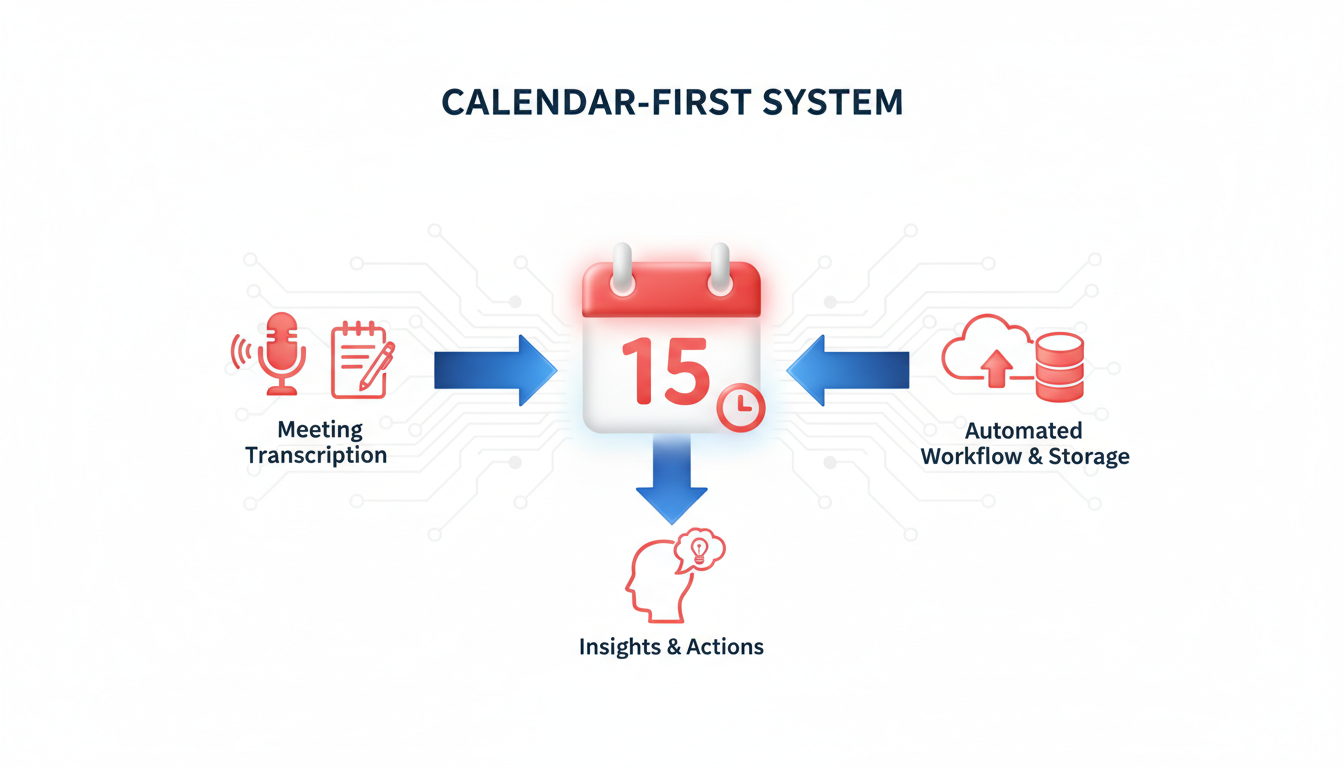
Imagine walking out of a meeting where crucial decisions were made, and you realize the notes are incomplete, or worse, nobody recorded them. This common scenario can result in lost opportunities and unclear action items. But what if your meeting documentation was always consistent and reliable? Enter the calendar-first system for meeting transcription.
By leveraging your calendar as the trigger for transcription, you can automate the entire workflow, eliminating the tedious manual task of note-taking. This system ensures that your meetings are automatically documented with minimal effort on your part. A calendar auto-join feature means you never have to worry about remembering to press record. Instead, meeting bots can seamlessly join your calls, capturing every word for accurate and detailed transcripts.
Let’s talk about common struggles: forgetting to take notes, inconsistent data capture, and misattributed quotes. Manual note-taking often fails due to human error or simply being overwhelmed by the meeting’s content. That’s where tools like DeepScribe come in, offering a reliable meeting notetaker solution that integrates smoothly with popular platforms like Zoom, Microsoft Teams, and Google Meet.
DeepScribe takes it a step further with AI-driven capabilities. It not only transcribes conversations with high accuracy but also generates insightful summaries and action items. Under optimal conditions, AI transcription is marketed at '99% accuracy', providing detailed and reliable outputs that can boost productivity by up to 30%. This is your secret weapon for efficient meetings and flawless follow-ups.
Moreover, a calendar-first approach is set-and-forget. Once your workflow is established, your calendar events automatically trigger transcription. This zero-friction setup ensures that transcripts, summaries, and action items consistently reach their designated destinations without you lifting a finger. For teams running multiple meetings daily, this isn’t just a convenience; it’s a game-changer.
With features like auto-join, speaker-labeled transcripts, and meeting summaries, DeepScribe positions itself as not just a tool, but a comprehensive solution for meeting documentation. So why not let your calendar lead the charge for error-free, efficient, and comprehensive meeting notes?
Setting Up Prerequisites and Governance
When automating meeting transcriptions, establishing a solid framework for storage and privacy is crucial. Let's dive into how you can seamlessly set up these prerequisites and ensure governance.
Choose Storage for Your Recaps
The first step is deciding where your transcriptions will reside. This might be within your existing project management tool or a dedicated cloud storage solution. Many teams prefer platforms that integrate directly with their existing workflows. This ensures that transcripts and summaries are easily accessible and action items can be tracked without unnecessary clicks.
Define Privacy Rules and Compliance Requirements
Security is a top priority, especially when sensitive information is involved. Ensure your tool adheres to SOC 2 Type II compliance, which verifies that the service provider manages your data with the highest security standards. DeepScribe specifically emphasizes such compliance, ensuring that your transcriptions are handled securely. This level of commitment helps reassure your team and stakeholders that data privacy is guarded against breaches.
Ensure Necessary Permissions for Calendar Access
For a calendar-first approach, your transcription tool needs permission to access your calendar. This enables the auto-join feature, aligning your meetings seamlessly with transcription automation. It’s vital to configure these permissions correctly to avoid any interruptions. Make sure calendar integrations are set up with the least friction possible, typically requiring just a one-time authentication.
Emphasize Encryption and Automatic Deletion
Encryption of your transcripts is essential. DeepScribe uses end-to-end encryption, protecting your data from potential threats. Moreover, an underrated yet crucial feature is automatic deletion after processing. This means that every piece of recorded audio that is no longer needed will be removed post-transcription. Automatic deletion reduces the risk associated with long-term storage of sensitive information.
Key Takeaway: Always verify that your transcription service not only secures stored data but also effectively eliminates unnecessary data thereafter.
These steps ensure your system is not just set-and-forget but also robustly protected. When privacy and compliance are baked into your workflow, you’re laying a solid foundation for worry-free meeting transcription automation.
Building Your Transcription System: Step-by-Step
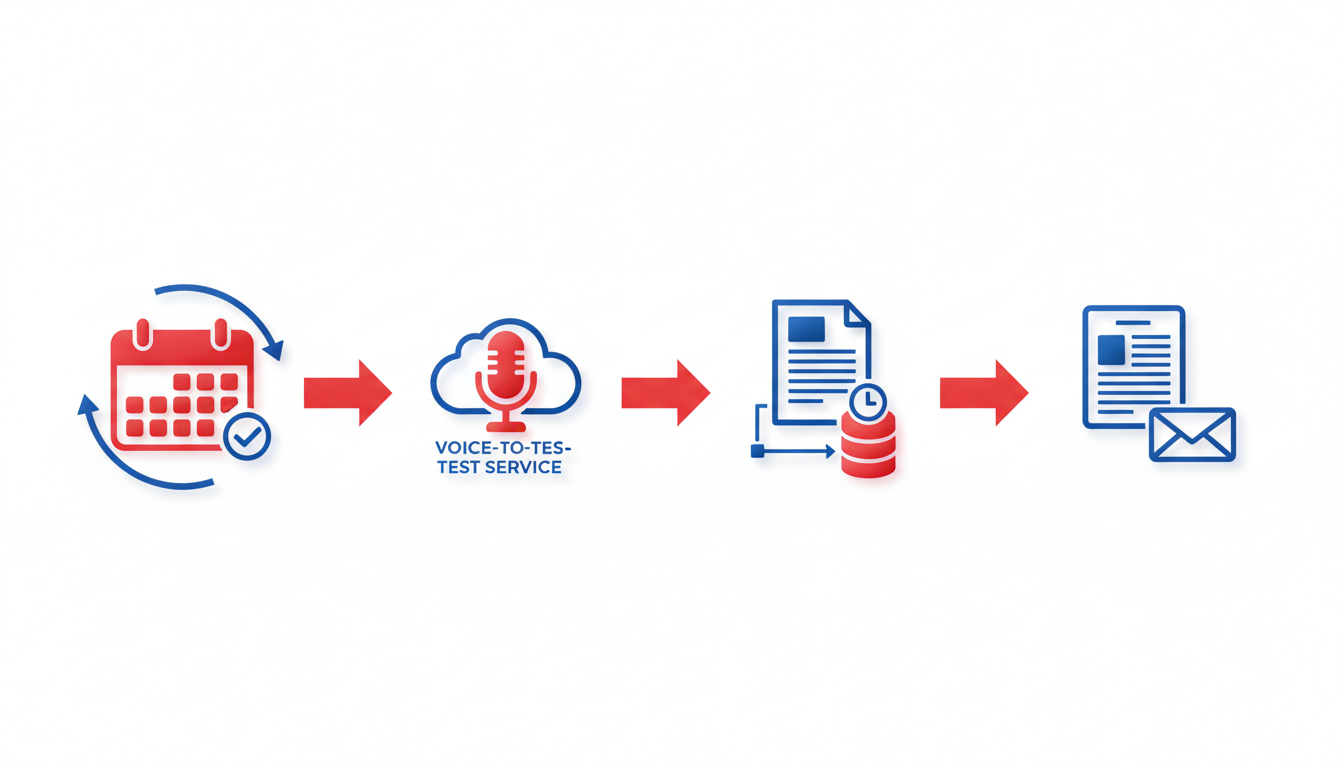
Creating a seamless transcription system starts with maintaining calendar hygiene. Think of your calendar as the launchpad for effortless meeting management. By using thoughtful naming conventions, you can ensure every meeting transcript lands where it needs to, without any additional sorting. For instance, include specific keywords or tags like "ClientCall" or "TeamReview" in your event titles. This helps systems like DeepScribe recognize and automate the transcription routing process, saving you from manual shuffling. Regularly audit your calendar to weed out redundancies and ensure all necessary information is there for a smooth automation ride.
Next, let’s set up the DeepScribe Meeting Notetaker. This tool is like your reliable sidekick, listening in and capturing every word without breaking a sweat. Once integrated, it synchronizes with your calendar automatically. This means you never have to remember to hit 'record'. Instead, DeepScribe’s meeting bots will auto-join your meetings, based on the rules you define in your calendar.
Pro Tip: Leverage calendar tags like "Record" or "Transcribe" to indicate meetings that need transcription. This ensures the Meeting Notetaker activates only where needed, optimizing your bot usage.
Transcription accuracy is crucial, and this is where DeepScribe shines, offering 99% accuracy under optimal conditions. To achieve this, configure transcript settings right from the start. Note that reducing background noise and ensuring clear speaker identification will significantly enhance accuracy.
Auto-Join Configuration
Implementing auto-join ensures that your transcription system is truly a "set-and-forget" model. DeepScribe offers different plan tiers, each with specific capabilities. Below is a breakdown of how auto-join settings vary by plan:
| Plan | Auto-Join Capability | Monthly Limits |
|---|---|---|
| Free | Manual enabled for select meetings | Not applicable |
| Basic | Auto-join for 5 meetings per month | 5 meeting bots/month |
| Pro | Unlimited auto-join for all meetings | Unlimited meeting bots |
| Business | Advanced options + custom integrations | Unlimited meeting bots |
DeepScribe’s auto-join feature is plan-dependent, providing flexibility based on your needs and scale. The Basic plan allows you to experience essential features like auto-join for up to five meetings monthly. However, consider upgrading to the Pro plan for unlimited access if your team holds frequent meetings.
To fully harness transcription settings for accuracy, consider:
- Speaker labeling: Each participant is identified and tagged, making it easier to follow discussions.
- Language preferences: Utilize the multilingual transcription capabilities, especially if your teams operate in diverse regions. DeepScribe handles dialogues in 100+ languages efficiently, ensuring nothing gets lost in translation.
Remember, the goal is to enable precise audio capture. Invest in quality microphones and conducive environments where possible, as these can further enhance transcription fidelity.
Delivery and Export
Once your transcription is captured and polished, it needs effective delivery. DeepScribe supports various export formats — from TXT, DOCX to subtitle formats like SRT, VTT — catering to different documentation needs. These exports ensure you're ready to share meeting insights widely across teams.
Regularly check the settings and exports to ensure compliance with your organization’s governance and privacy protocols. For example, with DeepScribe, auto-deletion after processing ensures sensitive information doesn’t linger unnecessarily, aligning with SOC 2 Type II standards.
By following these steps, you set a strong foundation for an efficient and automated meeting transcription workflow, leveraging your calendar as the central command center for seamless operations.
Applying the System to Different Meeting Types
Implementing a calendar-first, automated transcription system like DeepScribe can transform how meetings are captured across various formats. Let's delve into applying this system for specific meeting types, ensuring a seamless meeting recap process and generating effective meeting summaries.
Standup Meetings
Core Insight: Standup meetings benefit tremendously from concise daily updates being captured without fuss. DeepScribe's meeting notetaker can join these brief sessions automatically, ensuring that each team member's status update is documented.
- Why it Matters: Efficient tracking of daily progress and blockers enhances team transparency and accountability.
- Execution: Configure DeepScribe to auto-join your standup with the correct tagging in the calendar to streamline transcript organization.
- Done Looks Like: Accurate, succinct notes of daily updates stored automatically for easy reference.
1:1 Meetings
Core Insight: Ensure personal engagement and discussions are captured without compromising intimacy. With speaker detection, DeepScribe labels conversations accurately, ensuring personal nuances aren't lost.
- Why it Matters: Detailed records of these personalized meetings aid in relationship management and follow-up actions.
- Execution: Use calendar tags for 1:1s to prompt automatic transcription and summary generation.
- Done Looks Like: A detailed transcript with action items derived from discussions, sent to both participants.
Customer Calls
Core Insight: Documenting interactions with customers is crucial for sales and customer service excellence. DeepScribe's AI-generated action items ensure nothing falls through the cracks.
- Why it Matters: Comprehensive records support customer satisfaction and improved service tracking.
- Execution: Configure customer call tags in your calendar to trigger DeepScribe's transcription and summary tools.
- Done Looks Like: Transcripts and follow-up emails are automatically generated, facilitating seamless service continuity.
Interviews
Core Insight: Accurate recording of candidate conversations is vital. DeepScribe can capture every word, allowing hiring teams to focus on engagement rather than note-taking.
- Why it Matters: Ensures the hiring process is fair and transparent, with documented assessments for future reference.
- Execution: Set interview tags in your calendar, leveraging speaker labeling to keep candidate insights distinct.
- Done Looks Like: Rich transcripts capturing key competencies and candidate responses, ready for evaluation teams.
All-Hands Meetings
Core Insight: Summarizing large group discussions can be daunting without an effective transcription system. DeepScribe handles speaker variety and large volumes with ease.
- Why it Matters: Ensures that strategic priorities and company-wide announcements are accurately communicated to everyone.
- Execution: Enable calendar auto-join settings for large meetings, tagging them for automatic summary distribution to attendees.
- Done Looks Like: Summaries and action items distributed promptly post-meeting, avoiding information overload while keeping everyone in the loop.
Key Takeaway: By tailoring the DeepScribe system to different meeting types through strategic use of calendar tags and auto-join capabilities, organizations can ensure every meeting is efficiently captured and actionable. Maintaining a structured meeting documentation process not only enhances productivity but also aligns team efforts towards shared goals.
Here's a markdown table summarizing the application:
| Meeting Type     | Key Benefit                            | DeepScribe Setup                                   | Output Generated                  |
|------------------|----------------------------------------|----------------------------------------------------|-----------------------------------|
| Standup          | Captures daily updates                 | Auto-join via calendar tag                         | Daily update transcripts          |
| 1:1              | Logs personal engagement               | Speaker-labeled transcription                       | Detailed notes and action items   |
| Customer Calls   | Documents sales/service interactions   | Trigger with customer call tags                    | Complete records and follow-ups   |
| Interviews       | Records candidate insights             | Calendar auto-join with speaker labeling           | Rich candidate transcripts        |
| All-Hands        | Summarizes large group discussions     | Auto-join and automate summary delivery            | Summaries and company announcements|
By utilizing DeepScribe's capabilities, teams ensure each meeting type is efficiently captured, enhancing operational consistency and effectiveness.
Enhancing Accuracy and Troubleshooting
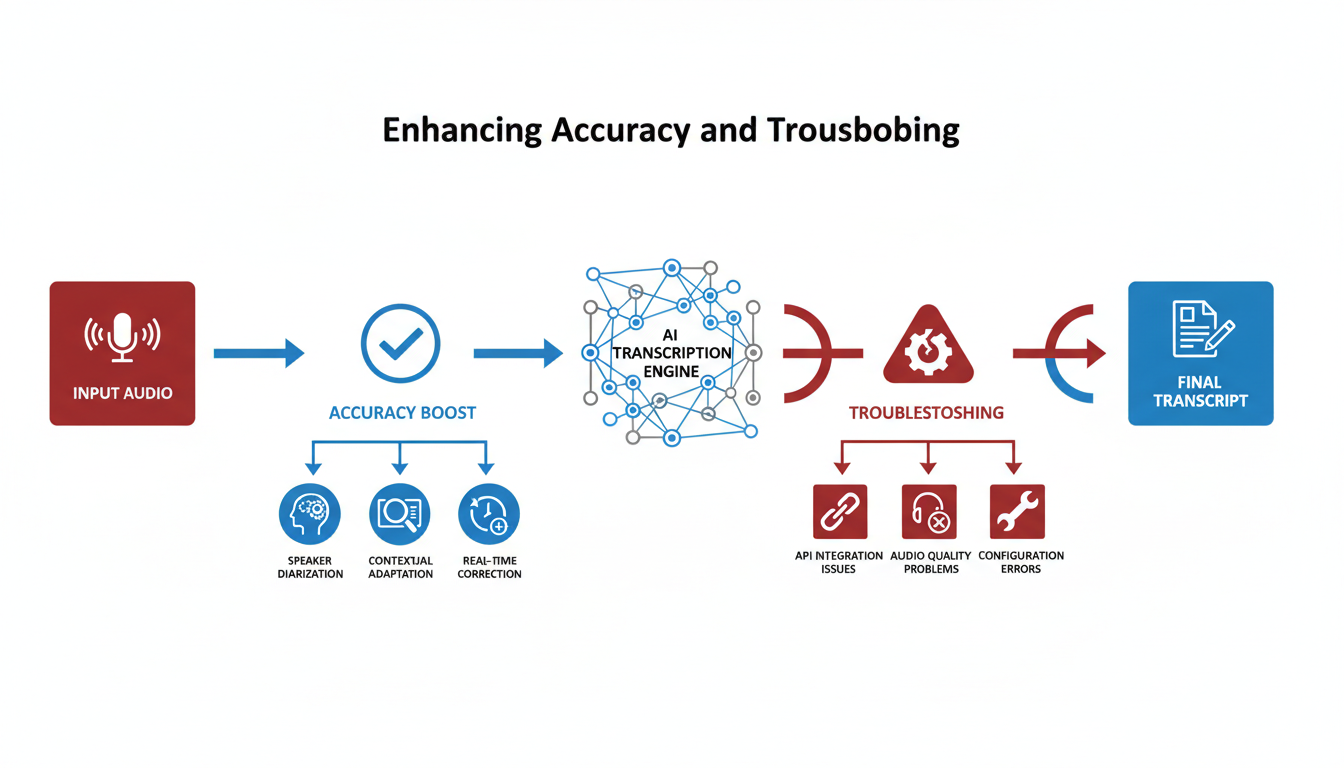
When it comes to speech-to-text accuracy, precision is key. Ensuring a clean and reliable transcript isn't just about the software you use but also how you prepare and conduct your meetings. Here’s how you can enhance transcription accuracy and troubleshoot common issues effectively.
Audio and Meeting Hygiene: The Basics
First off, a well-prepared meeting environment can drastically improve transcription outcomes. Follow these best practices:
- Microphone Quality: Invest in a good quality microphone. Built-in laptop mics can pick up unnecessary noise.
- Room Acoustics: Choose a quiet location with minimal echo. Soft furnishings minimize reverberation.
- Speaker Clarity: Encourage participants to speak clearly and at a consistent pace, avoiding interruptions whenever possible.
A proper setup is your first line of defense against transcription errors.
Boosting Transcription Accuracy
Even with optimal conditions, some subtleties can enhance AI accuracy:
- Structured Agendas: Share detailed agendas beforehand. It helps the AI predict and understand context.
- Speaker Labels: Make sure each participant is identified clearly in virtual meetings. Tools like DeepScribe offer advanced speaker detection, ensuring each voice is correctly attributed—a crucial feature for accurate documentation.
By preparing your sessions with these steps, you can leverage the full power of AI transcription. AI transcription is marketed at '99% accuracy' under optimal conditions.
Dealing with Challenging Environments
What if you’re in a noisy or fluctuating audio environment? Here are some troubleshooting tips:
- Noise-Canceling Features: Utilize noise-canceling tools or software during virtual meetings to suppress background noise.
- Encrypted Headsets: Using encrypted communication ensures less distortion and maintains privacy, which is vital for secure recordings.
For especially noisy settings, consider capturing audio separately with a high-quality portable recorder and then uploading it to a service like DeepScribe, which excels in handling background noise through its Whisper-powered accuracy.
Common Pitfalls and How to Avoid Them
Here’s what often goes wrong and how to fix it:
- Ignoring Calibration: Don't assume out-of-the-box settings are optimal. Configure your software’s noise settings, and test these in a mock meeting.
- Skipping Post-Checks: Always review transcripts post-meeting. Automated solutions like DeepScribe offer end-to-end encrypted, speaker-labeled transcripts. Ensuring sensitive content is captured correctly mitigates privacy concerns.
Effective transcription isn’t just about tech; it’s about marrying technology with attentive preparation. With tools and practices that enhance accuracy, from structured agendas to high-quality recording setups, you can reliably turn your spoken words into actionable insights every time.
"Many organizations find that implementing speaker identification and noise reduction techniques can significantly enhance transcription quality."
Integrating these elements into your workflow will save time and reduce manual correction, making each meeting not just more productive but also more secure. By using DeepScribe, you leverage advanced features like precision-focused transcription, speaker labeling, and seamless integration with platforms such as Zoom and Google Meet, enhancing your overall documentation process without added effort.
Templates and Naming Conventions
Creating a seamless meeting documentation process starts with having the right tools in place, and DeepScribe offers a streamlined approach. The magic lies in designing effective templates and establishing naming conventions that ensure clarity and consistency across your team. Let's dive into the strategies that will help you elevate your meeting transcriptions.
Designing a Meeting Recap Template
Think of your meeting recap template as the skeleton of your meeting documentation. It should be comprehensive yet easy to fill out. Start with a structure that includes:
- Meeting Title: Clearly stated and relevant.
- Date & Time: For quick reference.
- Participants: Who attended, listed for context.
- Agenda Items: What was planned to be discussed.
- Key Points Discussed: Highlights or critical notes.
- Action Items: Clearly marked tasks with owners and deadlines.
- Next Steps: What follows from here.
This template ensures that all meetings are documented uniformly, allowing team members to quickly find the information they need without sifting through disorganized notes.
Standardized Naming Conventions for Easy Retrieval
A consistent naming convention is key to easily retrieving transcripts and summaries. Use a format like: YYYYMMDD_ProjectOrMeetingName_Team. For example, for a project kickoff meeting on March 3, 2023, use 20230303_ProjectKickoff_TeamA. This helps in organizing files chronologically and by project.
- Date first: Ensures chronological order.
- Descriptive Name: Clearly identifies the meeting.
- Team or Department: Identifies responsibility or relevance.
Implementing these conventions enhances searchability and keeps your documentation clutter-free.
Delivery Rules: Who Gets What Summary and When
Establish clear rules on who receives meeting summaries and when they should receive them. Typically, this includes:
- Attendees: Always get the full recap.
- Stakeholders: May need only the action items.
- Timeline: Deliver daily or weekly, depending on the team's pace.
For example, team leads might get daily briefs while stakeholders receive weekly summaries, aiding in decision-making without overwhelming them with daily details.
Ensuring Consistency Across Team Use
To maintain a high standard, establish governance policies. This includes checking for audio quality, ensuring speaker identification, and setting security measures with DeepScribe to protect sensitive information. Consistent use of templates and naming conventions ensures that all documentation aligns, fostering a coherent workflow across your organization.
Pro Tip: Regular audits and feedback loops can help identify areas for improvement in your meeting documentation process. This adaptability keeps your system efficient and relevant as team needs evolve.
By embedding these practices, you harness the full power of DeepScribe, transforming your calendar into a hub of accurate, reliable, and actionable meeting documentation.
Launching Your Automated Workflow
Congratulations, you're at the finish line of setting up your automated transcription workflow! Here's a quick recap and a handy checklist to ensure a smooth launch, plus some final tips to get the most out of DeepScribe's capabilities.
Key Takeaway: Make your calendar the automatic command center for a seamless transcription process.
Recap of the 3-Part System: Trigger, Capture, Delivery
Trigger: Your calendar is now a powerhouse, automatically kicking off each meeting's transcription. As soon as an event is scheduled, DeepScribe's auto-join feature takes over, reducing the chance of missing critical meetings. This ensures every meeting—be it a standup, 1:1, or a large all-hands—is captured accurately.
Capture: Once the meeting has begun, DeepScribe’s bot dives in, delivering real-time transcription. Thanks to the AI's capabilities, even under optimal conditions, you can expect an impressive 99% accuracy. This aligns with industry benchmarks and ensures clarity in speaker attribution and meeting content.
Delivery: Finally, the polished transcript paired with a summary is delivered straight to your designated repository—whether that's a team folder, email, or cloud storage. This automation ensures that action items and summaries are available to your entire team without delay, enhancing workflow efficiency.
15-Minute Launch Checklist
Calendar Sync Confirmation:
- Ensure your calendar integrates with DeepScribe. This setup is pivotal for the auto-join function.
Meeting Bot Configuration:
- Verify the allocation of meeting bots to match your current plan’s limits. The Basic plan includes 5 meeting bots per month, with Pro/Business offering unlimited access.
Speaker Identification Settings:
- Activate speaker tagging for precise attributions during transcriptions. This helps in tracking decision-making and accountability.
Privacy and Security Protocols:
- Confirm encryption settings and automatic deletion protocols post-processing for maintaining confidentiality and compliance with SOC 2 Type II standards.
Review Custom Prompts:
- Utilize custom AI prompts available on Business tiers to standardize outputs—ideal for generating structured notes or action items.
Testing and QA:
- Conduct a test run by scheduling a mock meeting. Review the transcript and summary to ensure that the system captures and delivers accurately.
Distribution Setup:
- Verify distribution workflows. Ensure that transcripts and summaries are routed correctly to recipients using predetermined rules.
By implementing this checklist, you can launch your automated transcription workflow with confidence. Expect a marked lift in productivity—as much as a 30% boost in note preparation speed. This seamless integration not only saves time but also brings consistency and accuracy to your meeting documentation process.
By following these steps, you're positioned to revolutionize your meeting management, making every session count with precise records and actionable insights. Start your journey today with DeepScribe, ensuring your organization's operations are as efficient and reliable as possible.
Frequently Asked Questions
How can I ensure transcript accuracy?
Ensure good audio quality and use accurate platforms like DeepScribe for higher accuracy.
What are the privacy concerns with AI transcription?
Ensure compliance with privacy standards like SOC 2 Type II and use encrypted systems.
Can I customize my meeting recaps?
Yes, with DeepScribe, you can use custom prompts and templates.
What types of meetings work best with this system?
Recurring, structured meetings like standups and customer calls benefit most.
How does calendar auto-join work?
It syncs with your calendar to automatically join meetings based on your setup.
Conclusion
Implementing an automated transcription system is a game-changer for efficient meeting documentation. By leveraging the simple 3-part system—calendar trigger, capture, and delivery—you ensure consistent and reliable recaps. Here's a quick recap:
- Calendar Trigger: Automatically schedule transcription with your meetings.
- Capture: Utilize real-time transcription for accurate, speaker-labeled notes.
- Delivery: Seamlessly receive summaries and action items post-meeting.
To get started, follow a 15-minute checklist: sync your calendar, choose your preferred export format, and select the correct plan based on expected bot usage.
DeepScribe's Meeting Notetaker simplifies this entire process. For individuals, the Basic plan offers essentials, while teams might prefer the Pro or Business plans for unlimited bots and additional export formats. Ready to streamline your workflow? Explore DeepScribe to see how it fits your needs.
Written by

DeepScribe Team
Content Team
The DeepScribe content team shares insights on audio transcription and AI technology.
Related Articles
Continue reading about this topic

How to Automate Meeting Transcripts from Your Calendar Workflow
Discover a seamless, calendar-first workflow for automating meeting transcripts and recaps using DeepScribe. This guide ensures reliable capture and delivery.

DeepScribe Team
March 13, 2026 · 19 min read · 3,757 words