
How to Build an AI Meeting Transcription Guide for Your Team
Discover how to standardize your team's meeting transcription process with a detailed guide using DeepScribe. Achieve consistent, searchable, and auditable transcripts.

DeepScribe Team
Content Team
How to Build an AI Meeting Transcription Guide for Your Team
You turned on automatic meeting transcription, expecting a seamless record-keeping system. Instead, you now have 200 files named "Meeting Recording (3)," with inconsistent notes and unclear speaker attributions. Sound familiar? The reality is, without standards, transcripts become an unreadable mess, making it impossible to extract meaningful insights or actions. But what if your meeting transcriptions could operate like a finely-tuned internal system rather than a chaotic tool?
Welcome to your ultimate guide on deploying AI meeting transcription as a standardized, organizational system. We'll explore how to implement a team-wide playbook that makes every transcript searchable, auditable, and effortlessly exportable. With DeepScribe as our reference workflow, you'll discover how to transform meeting chaos into clarity through naming conventions, speaker labeling, summary formats, and strategic storage solutions. By the end of this guide, you'll have everything needed to standardize your transcription process with concrete templates and decision rules, ensuring your team never misses a critical insight again.
Introduction: The Pitfalls of Unstandardized Transcripts
Imagine this: your team has diligently recorded every meeting, enabling automatic transcription, but now you’re left sifting through 200 files named "Meeting Recording (3)." Sound familiar? This is a common scenario for many teams dealing with unstandardized transcripts. Without a clear system, transcripts become an ocean of unreadable data, making it nearly impossible to extract value from your meetings.
Unstandardized transcripts lead to two major failures: (1) they turn into messy data dumps, and (2) the notes captured are inconsistent, leaving you unable to trust or reuse them efficiently. These transcripts often suffer from unclear speaker attribution, making it hard to determine who said what. Imagine searching for a crucial decision and ending up lost in a pile of ambiguities.
This chaos not only results in loss of valuable information but also elevates the risk of miscommunication. Teams struggle to find previously discussed action items, and critical insights get buried, leading to repeated meetings and wasted time.
Enter DeepScribe, a platform designed to transform how your organization handles meeting documentation. With DeepScribe, you don’t just turn on transcription; you implement an internal operating system. This system standardizes processes to make transcripts searchable, auditable, and exportable across your organization. By using DeepScribe’s structured approach, you harness the power of AI to create repeatable standards that ensure consistency.
With DeepScribe, each transcript is meticulously organized with a clear naming convention and speaker labels, resulting in clean attribution. The integrated AI effortlessly generates summaries and action items, minimizing manual oversight. This eliminates the dreaded unreadable dump, crafting precise and actionable documentation every time.
Imagine transforming meeting chaos into clarity with a system so reliable that it becomes second nature for your team. DeepScribe’s comprehensive approach not only simplifies your workflow but also elevates it—making your transcripts an asset rather than a hurdle.
By diving into this AI meeting transcription guide, you’re setting the stage for a seamless and efficient standardization process. Prepare to turn your transcripts into a treasure trove of insights, all with the help of DeepScribe’s robust features tailored to your team’s needs.
Defining Transcription Scope and Success
Determining which meetings to transcribe is crucial for optimizing resources and ensuring that your transcription workflow aligns with organizational needs. Start by considering the significance and impact of different meetings. High-stakes executive meetings, strategy sessions, and key collaborative discussions are excellent candidates. These meetings often involve critical decisions, action items, and information valuable across teams. On the other hand, informal check-ins or redundant updates may not need detailed transcripts. By assessing the strategic importance, you'll prioritize effectively and ensure your team is capturing meaningful content.
Once you’ve identified target meetings, it's essential to establish what a successful transcription looks like. A successful transcription should be accurate, meaning it reliably captures the conversation without distortion, ensuring every word spoken is documented. Tools like DeepScribe, powered by Whisper technology, ensure a 99% accuracy rate. Searchability is another pillar of success; transcripts should be easily navigable, allowing users to find key phrases or sections quickly through a well-organized system. This is where employing a robust meeting documentation SOP becomes vital, as it structures transcripts for easy retrieval.
Action-driven transcripts are also paramount. Beyond documenting dialogue, successful transcriptions highlight action items, decisions, and ownership. This turns your transcripts from static documents into dynamic tools for follow-up and accountability. Implementing a standardized summary format within each transcript can transform raw data into actionable insights.
Key Takeaway: Your transcripts should be precise, searchable, and serve as a catalyst for action, turning meetings into opportunities for tangible progress.
Setting clear objectives for the transcription process ensures alignment with organizational goals. Define what success means for your team. Is it reducing the time spent on manual notes? Improving cross-departmental communication? Align these objectives with operational standards to make transcripts a critical part of your workflow. For further insights on optimizing transcription processes, see our guide on How to Transcribe Zoom Meetings with AI.
Step 1: Establish a Transcript Naming Convention
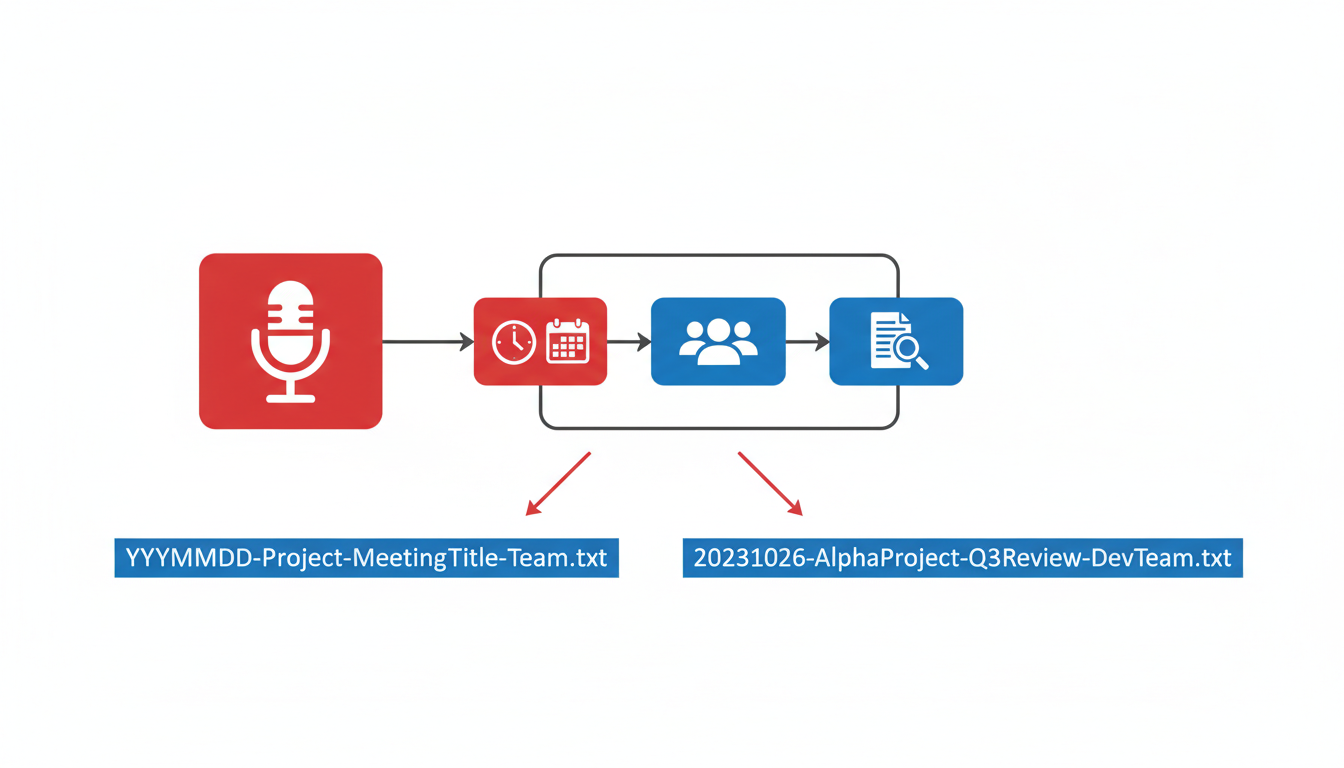
Creating a consistent transcript naming convention is vital for seamless retrieval and effective auditing across your organization. Instead of drowning in a sea of “Meeting Recording (3)”-type files that provide little context, a structured approach lets your team quickly locate and trust the necessary information.
Key Insight: A clear naming convention ensures that transcripts are both searchable and auditable, reducing confusion and enhancing collaboration.
Why Consistency Matters
Consistency in naming conventions is more than a formality — it's a necessity. It enables easy file retrieval months down the line and helps ensure everyone is literally on the same page. With a uniform system, anyone in HR, Ops, or management can find what they need without hunting through a maze of poorly labeled files.
Recommended Naming Schema
Here's a tried-and-true schema you can adopt or adapt to fit your needs. Consider including the following components in your file names:
- Date (YYYY-MM-DD): Ensures chronological sorting.
- Meeting Subject/Project Name: Provides context at a glance.
- Speaker/Department Identifier: Indicates who led or was primarily involved.
- Version Number: Helpful for drafts and revisions.
Example: 2023-11-01_ProjectX_DeptMeeting_V1
Copy/Paste Template
Use the format below to establish your organization's naming standards:
YYYY-MM-DD_MeetingSubject_ProjectName_Dept_Speaker_V#Data Table for Naming Convention
Here’s a detailed breakdown to ensure clarity:
| Component | Description | Example |
|---|---|---|
| YYYY-MM-DD | Date of the meeting | 2023-11-01 |
| MeetingSubject | Brief subject or title | ProjectXUpdate |
| ProjectName | Name of project or initiative | ProjectX |
| Dept/Speaker | Responsible dept. or lead speaker | Finance |
| V# | Version of the document | V1 |
Takeaway: By standardizing your file naming, you create a searchable, auditable system that enhances information transparency and trust within the organization.
DeepScribe Integration
DeepScribe can simplify this process using its AI-powered transcription capabilities, ensuring that meeting details are captured with high accuracy and labeled for easy identification. Explore more about DeepScribe’s transcription solutions.
Step 2: Implement Speaker Labeling Rules
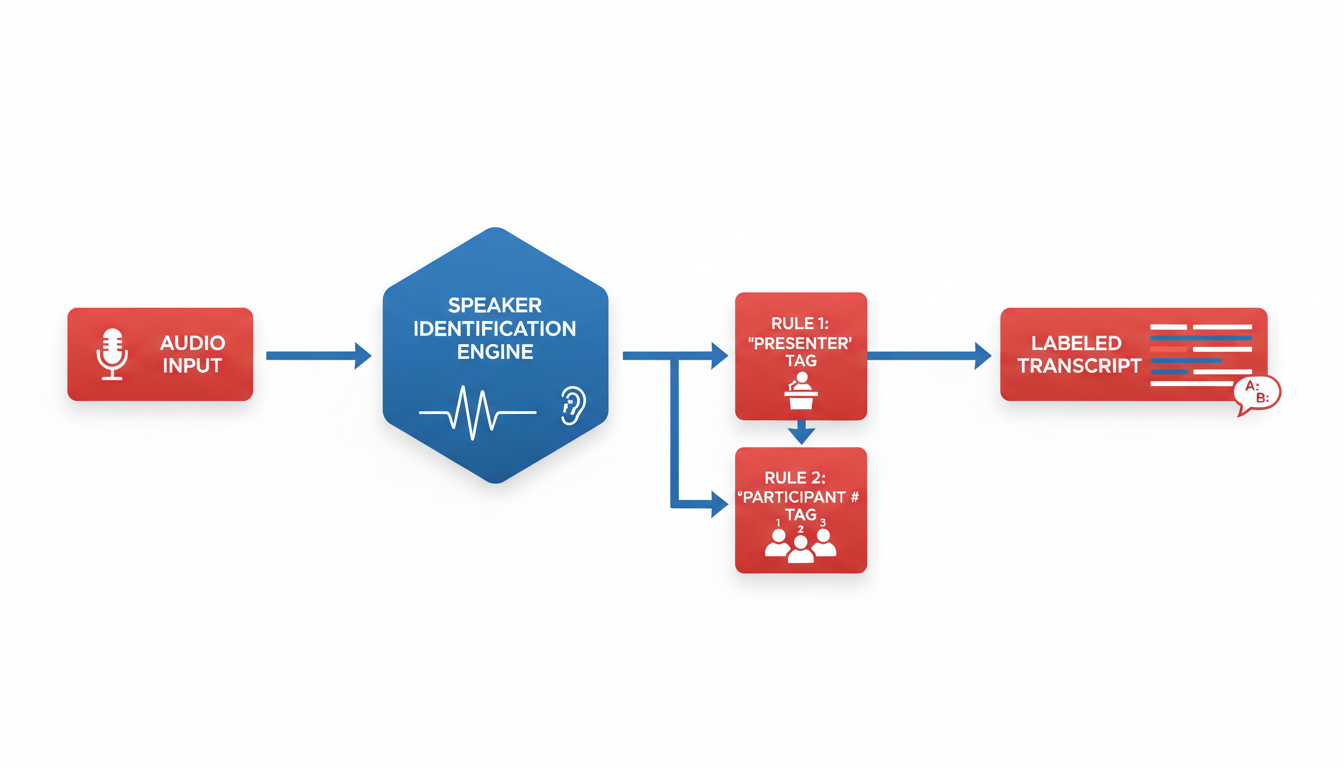
Navigating the challenge of accurately attributing dialogue in speaker-labeled transcripts is crucial for clean and usable meeting recordings. With DeepScribe's advanced speaker detection capabilities, you can ensure your transcripts maintain clarity and context.
First, familiarize your team with DeepScribe’s speaker identification system. It automatically analyzes audio inputs and assigns labels, efficiently managing multi-speaker environments like interviews or team meetings. However, like any AI-driven feature, it’s essential to have rules in place for when corrections are necessary.
Establishing Speaker Labeling Rules
The foundation of clear speaker labeling lies in consistency. Here’s a simple guide to ensure attributions remain accurate:
1. Initial Review and Correction:
- After transcription, a designated team member should review the transcript to verify speaker labels.
- Always compare speaker labels to any recorded video or audio cues—this can help rectify any inaccuracies where similar voices may be confused.
2. Feedback Loop:
- If a mislabeled speaker is found, correct it directly within DeepScribe’s interface. Encourage team members to flag recurring errors, providing data for the tool to improve identification accuracy over time.
3. Create a Labeling Template:
- Use a standard naming convention for speakers (e.g., "Speaker 1: [Name]") at the beginning of the transcript. This improves both searchability and auditability.
4. Implement a Speaker Role Legend:
- In meetings involving established roles (e.g., “Moderator,” “Speaker”), use predefined labels to maintain clarity throughout documents.
Guidelines for Correcting Mislabeled Speakers:
If you find that a transcript has mislabeled speakers, here are steps to correct this using DeepScribe:
- Navigate to the specific section in the transcript within the DeepScribe dashboard.
- Use the edit feature to adjust speaker labels quickly.
- Frequently update labels if recurring inaccuracies are observed, gradually training the AI.
Implementing these rules ensures that transcripts not only reflect the conversation accurately but also make future reviews frictionless. This builds trust in the documentation process, making your AI meeting transcription guide a robust operational system.
Step 3: Creating a Summary Schema
Creating a standardized meeting summary format is crucial to ensure consistent and actionable insights are derived across different departments. A well-structured summary schema can help Ops, HR, and team leads maintain clarity, accountability, and continuity in their workflows.
Developing a Unified Summary Format
Begin by creating a single summary format that is flexible enough to be used across various departments. This format should encapsulate key elements such as decisions made, action items, identified risks, and follow-up points. Let's break these components down for a clearer understanding:
Decisions: Clearly outline any decisions that were made during the meeting. This should include what the decision was, who made it, and why it was decided. For example:
**Decision**: Shift project deadline to March 15.
**Made by**: Sarah, Head of Product.
**Rationale**: Aligns with the marketing strategy timeline.
Action Items: Categorize action items by urgency and assign clear owners and deadlines. Utilize an action items template to maintain consistency:
- **Action Item**: Update project plan to reflect new deadline. - **Owner**: Jake, Project Manager. - **Deadline**: February 10.Risks: Document any potential risks discussed during the meeting, including their impact and mitigation strategies:
**Risk**: Potential delay in resource procurement. **Impact**: Could push the project back by two weeks. **Mitigation**: Expedite procurement process with suppliers.Follow-ups: Ensure every meeting ends with clear follow-up actions and scheduled reviews or check-ins. This keeps the accountability cycle intact:
**Follow-up**: Review updated project timeline on February 15.
Standardizing Across Departments
Standardization increases efficiency and trust in the meeting transcription process. By implementing a unified schema, teams ensure that every summary is easily decipherable and reliable. This is essential for those handling sensitive information, especially within HR.
For instance, HR might tailor the summary schema to highlight sensitive topics around personnel, while Ops might focus more on process improvements and efficiency gains. Despite these differences, the core structure remains constant, enabling cross-departmental sharing and learning.
Applying DeepScribe Capabilities
DeepScribe's AI-powered summaries can seamlessly integrate with this schema by automatically generating and categorizing meeting notes. The platform’s speaker detection and labeling ensures that all contributions are correctly attributed, fostering accountability. This allows teams to focus more on strategic discussions rather than note-taking minutiae.
“An effective summary schema not only brings clarity but also ensures that crucial information is captured consistently and accurately across all teams.”
For more on how DeepScribe creates accessible and reliable meeting intelligence, check out their dedicated features here.
Step 4: Actionizing Transcripts
Navigating the post-meeting chaos of unwieldy transcripts? Let’s transform those notes into meaningful actionables. DeepScribe steps in with AI-driven task extraction, ensuring every decision is not only captured but actionable.
Key Insight: AI can intelligently parse meeting transcripts to identify decisions and tasks, saving time and enhancing productivity. With DeepScribe, the integration of meeting notes into actionable items is seamless and efficient.
Templates for Formatting Action Items
Creating a consistent format is crucial for clarity and execution. Start with a simple action item template:
- **Task**: [What needs to be done]
- **Owner**: [Assigned to]
- **Deadline**: [Due date]
- **Priority**: [High/Medium/Low]
- **Notes**: [Additional context]
This template ensures all tasks are clear, traceable, and prioritized within your team’s existing workflows.
Ensuring Tasks Are Assigned and Tracked
Inconsistency kills productivity. By integrating these actionable tasks with your team’s workflow tools, you guarantee accountability. For instance:
- Capture: Use DeepScribe’s AI to auto-extract tasks directly from the transcript.
- Assign: Allocate tasks using project management tools like Asana or Trello. Export from DeepScribe in formats that integrate seamlessly, such as DOCX or PDF.
- Track: Regularly review progress during meetings. DeepScribe’s live transcription capability ensures updates are captured and followed up.
Real-World Workflow
Imagine you're a program manager who relies on DeepScribe after each weekly team meeting:
- The AI identifies tasks within minutes, highlighting responsibilities.
- You then use the action items template to export and upload tasks into your PM tool.
- Each task is assigned and deadlines are set, aligning with project goals.
This systematic approach eliminates guesswork and ensures nothing falls through the cracks. Remember, the end goal is to move from mere transcription to actionable intelligence. To explore more on AI meeting summaries and task management, check out our detailed guide.
Key Takeaway: Actionizing transcripts transforms passive notes into dynamic tools for progress. Make every meeting count with a structured approach to task management, empowered by DeepScribe’s AI capabilities.
Step 5: Exporting Transcripts Effectively
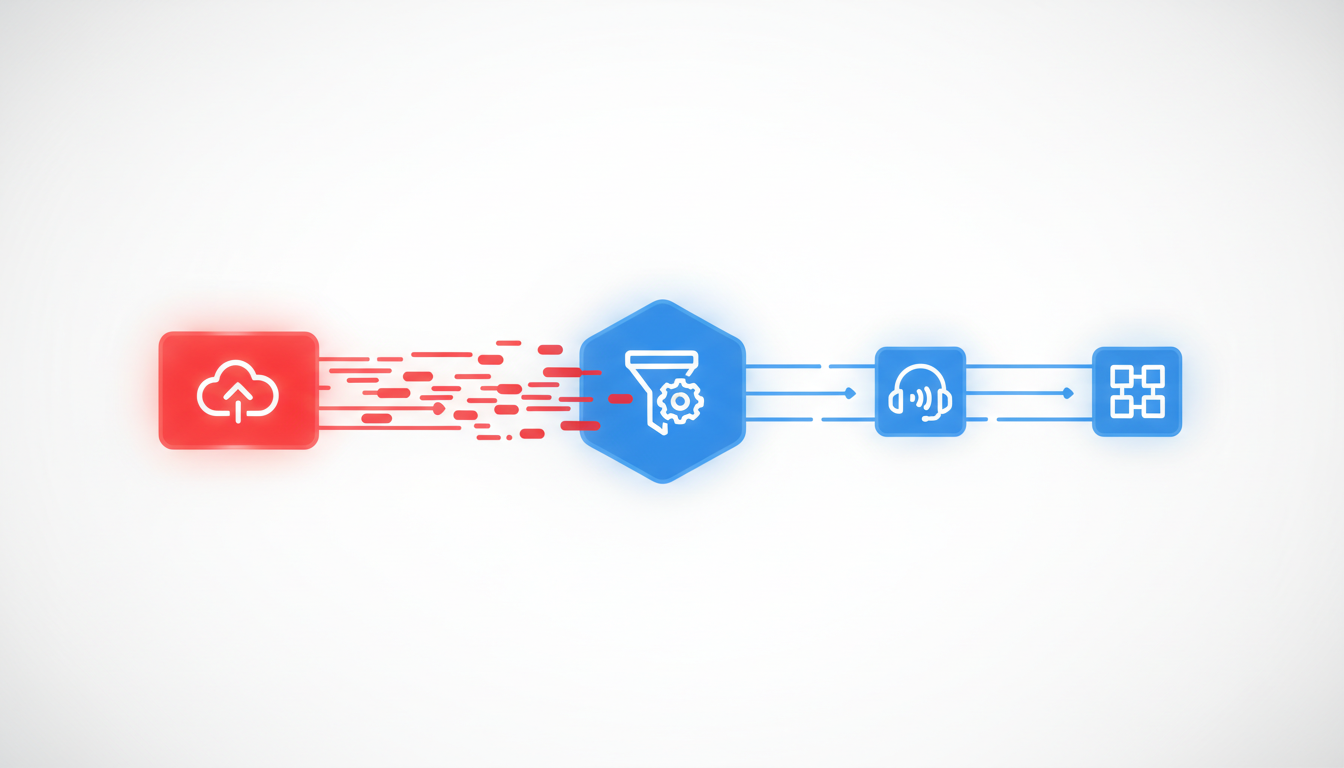
When it comes to exporting transcripts, choosing the right format can make all the difference. With DeepScribe, you have access to a variety of formats, each tailored for different needs: TXT, DOCX, PDF, SRT, and VTT. Let's explore when to use each one and how to leverage them effectively.
Understanding Export Formats
TXT (Plain Text): Ideal for quick, lightweight sharing or integration into other text-processing tools. It’s the go-to option when you need simple, unformatted text.
DOCX (Word Document): Use this format for document creation or when transcripts need to be styled or annotated. It’s perfect for internal reports or sharing with stakeholders who prefer a formal document layout.
PDF (Portable Document Format): Provides a secure, non-editable format that’s excellent for official records or when sending documents to external partners who should view, but not alter, the transcript.
SRT (SubRip Subtitle): This format is used for captioning video content. It synchronizes text with video timestamps, essential for improving accessibility and engagement in video content.
VTT (WebVTT Subtitle): Similar to SRT but with enhancements for web usage, including metadata. It’s preferred for HTML5 videos or in scenarios where additional styling and positioning are required.
When to Use Each Format
Choosing the right export format depends on your workflow needs and the subsequent use of the transcript:
| Format | Use Case | Recommended Workflow |
|---|---|---|
| TXT | Initial drafts, editing in bulk | Basic sharing, internal review |
| DOCX | Document archives, collaboration with comments | Detailed analysis, styling, feedback collection |
| Finalized documents, non-editable records | Archiving, external distribution, legal documentation | |
| SRT | Video projects, adding subtitles | Sync with video content, accessibility enhancements |
| VTT | Advanced web video projects, additional metadata | HTML5 video integration, detailed web captions |
Decision Matrix for Export Formats
To make your exports seamless, use this simple decision matrix:
| Scenario | Optimal Format |
|---|---|
| Need fast, lightweight text | TXT |
| Styling and document formatting | DOCX |
| Secure, final documents | |
| Video subtitles | SRT |
| Web video with metadata | VTT |
Understanding these options helps avoid clutter and ensures your team consistently delivers polished, user-friendly outputs. Leverage DeepScribe’s seamless integration to implement these formats in your daily workflow.
Step 6: Storage and Accessibility
When it comes to transcript governance, establishing a structured storage system is non-negotiable. Imagine sifting through a sea of ambiguously named files months down the line. Enter a well-defined foldering system. Start by creating a hierarchical folder structure: top-level folders for the year or project, and subfolders by departments or specific initiatives. This keeps files organized and makes retrieval intuitive.
Next up is transcript retention policy. Not all transcripts need indefinite storage. Determine which types of meetings require long-term retention and which can be archived or deleted sooner. For example, sensitive HR conversations might stay for the required retention period due to compliance needs, while weekly team huddles might not.
Permissions and access controls are critical in ensuring that transcripts are both secure and accessible to the right people. Use role-based access to manage who can view, edit, or download transcripts. Tools like DeepScribe incorporate end-to-end encryption, ensuring transcripts remain secure during storage and transfer. Additionally, with SOC 2 Type II compliance and automatic deletion policies, teams can trust that sensitive information is handled responsibly.
To make transcripts easily retrievable, develop a consistent naming convention. Include elements like date, team, and meeting purpose in file names. This practice enhances searchability and reduces retrieval time. Also, consider integrating a search function within the storage solution; this allows teammates to locate relevant transcripts with keyword searches quickly.
Key Takeaway: A well-structured storage and accessibility strategy not only enhances efficiency but also safeguards sensitive information, providing a seamless and secure experience for your team.
Finally, aim for a solution that allows seamless integration with other tools your team uses daily, ensuring that transcripts are not siloed but part of a larger ecosystem of information. By implementing these steps, you'll transform your organization's transcript management from a daunting task to a streamlined operation.
Step 7: Governance and Quality Assurance
Imagine diving into a sea of transcripts only to find them riddled with errors and inconsistencies. Without proper governance and quality assurance (QA), your AI meeting transcription guide may struggle to gain trust across your organization.
Implementing QA Processes for Transcript Accuracy
The first step is to ensure that your transcripts are accurate and comprehensive. DeepScribe, with its Whisper-powered accuracy, offers 99% transcription accuracy even amidst background noise or technical jargon. However, integrating a QA step can further enhance this. Consider having a dedicated team member review a random sample of transcripts weekly. They can check for common errors like misattributions or technical term inaccuracies. Document feedback and refine your transcription settings based on these insights.
"Even the best AI benefits from human oversight. Regularly reviewing transcripts fosters trust in automated processes."
Establishing a Governance Model
Now, let’s explore how to maintain these standards. A governance model is crucial for consistency. Define who oversees the transcription process and how often procedures are reviewed. Create a standardized meeting minutes format that all teams follow. This format could include sections for main discussion points, decisions, action items, risks, and follow-ups. Ensure every transcript adheres to this structure by implementing template checks in DeepScribe.
Consider setting clear protocols for speaker labeling and file naming conventions. For example, adopt a standard that uses meeting date and key topics as transcript names (e.g., "2023-10-29_Project_Update"). This makes future retrieval a breeze.
Compliance and Security Measures
DeepScribe’s commitment to security—through end-to-end encryption and SOC 2 Type II compliance—means your organization can safely handle transcripts, even those involving sensitive HR conversations. Additionally, transcripts are automatically deleted after processing, further safeguarding privacy.
Establish policies on who can access different types of meeting transcripts. For instance, HR meeting notes might be stored separately with restricted access, while project updates could be openly shared within relevant teams.
By combining rigorous QA with a structured governance model, your AI meeting transcription guide becomes a reliable, standardized system that transforms meeting chaos into organized clarity.
Operationalizing: Rollout and Training
Building a successful AI meeting transcription system requires more than just turning on a tool—it demands a strategic rollout plan. Begin by creating a phased approach that includes pilot testing, comprehensive training, and policy enforcement to ensure lasting adoption.
Phased Rollout Plan
Pilot Phase: Start with a small, focused group within your organization to test the AI meeting transcription system. Use this phase to identify potential challenges and gather feedback.
Training Development: Create detailed training materials tailored to different team roles. Consider using formats like videos, step-by-step guides, and live Q&A sessions. Clearly emphasize how DeepScribe's capabilities—such as speaker labeling and AI summaries—address common pain points, making transcripts both accurate and actionable.
Policy Enforcement: Institutionalize practices through clear policies. Define naming conventions, speaker labeling rules, and summary schema to prevent inconsistencies that plague many organizations. Highlight how consistent use of DeepScribe features can turn raw data into actionable insights.
Expert insight: "Effective rollout doesn't just democratize access to transcripts; it democratizes clarity and action across teams."
Continuous Improvement Loops
Establish feedback mechanisms to iterate on the transcription process continuously. Use regular check-ins and surveys to identify gaps and address them swiftly.
- Implement feedback from early adopters and adjust training materials accordingly.
- Use analytics to track the adoption and effectiveness of transcription outputs, like how often summaries and action items are referenced.
Example: Training Workshop Outline
- Introduction to DeepScribe: Overview and advantages
- Hands-On Practice: Transcribing a meeting using DeepScribe
- Q&A Session: Addressing attendee queries
- Best Practices: Reviewing naming conventions and summary guidelines
| Phase | Description |
|---|---|
| Pilot | Small group testing to gather initial feedback |
| Training | Develop role-specific materials like guides and videos |
| Enforcement | Establish policies for naming, labeling, and summarizing |
| Feedback Loop | Regularly gather feedback and update processes accordingly |
By thoroughly operationalizing the rollout, your organization can ensure seamless integration of AI meeting transcription, turning chaotic notes into a structured, actionable resource.
Conclusion: One-Page SOP Recap
Wrapping up our journey to mastering AI-powered transcription with DeepScribe, let's solidify what we've built. Here's a streamlined guide to setting up a standardized transcription system that ensures clarity and utility across your organization.
Key Steps in the Transcription Guide
Capture the Meeting: Utilize DeepScribe's Meeting Notetaker to record audio seamlessly. Benefit from its integration with major platforms like Zoom and Google Meet.
Speaker Labeling: Apply consistent speaker labeling rules in your transcripts to maintain clarity. DeepScribe’s advanced speaker detection ensures accurate attributions.
Summary and Action Items: Use DeepScribe's AI to generate concise summaries and actionable items post-meeting. This feature captures decisions, tasks, and deadlines effectively.
Export Formats: Choose the right export format with DeepScribe — TXT for basic transcripts, DOCX and PDF for detailed document sharing, and SRT or VTT for video captions.
Storage and Governance: Implement a robust naming convention and storage strategy to keep your transcripts organized and easily retrievable. Prioritize encryption and auto-deletion settings to align with privacy policies.
Implementation Checklist
- Pilot Phase: Start with a small team to test the system.
- Policy Creation: Develop clear guidelines utilizing DeepScribe templates.
- Training Program: Conduct training sessions to familiarize teams with the process.
- Quality Assurance: Regularly review transcripts for adherence to standards.
- Iterate and Improve: Gather feedback and optimize the workflow.
Benefits of Using DeepScribe
DeepScribe transforms the chaos of traditional meeting notes into a coherent system. It offers 99% accuracy powered by Whisper and supports multilingual transcription, making it a top choice for diverse teams. Its security features, such as end-to-end encryption and SOC 2 compliance, ensure that sensitive information remains protected. By integrating DeepScribe, you’ll join over 50,000 professionals already benefiting from streamlined meeting documentation.
For a deeper dive into AI transcription, visit the DeepScribe Blog for more insights and resources.
Once you've set up your system, keep exploring ways to enhance your team's efficiency with DeepScribe’s versatile features.
Frequently Asked Questions
What is the best way to label speakers in transcripts?
Use AI tools like DeepScribe for automated speaker detection and apply consistent labeling rules.
How can I standardize meeting summaries?
Create a summary schema including decisions, action items, and follow-ups to ensure consistency.
Which export format should I choose for transcripts?
Choose formats based on usage: DOCX/PDF for documents, SRT/VTT for subtitles and captions.
How does DeepScribe ensure transcript security?
DeepScribe offers end-to-end encryption and complies with SOC 2 Type II standards.
What is a good naming convention for transcripts?
Use a consistent format, such as 'YYYY-MM-DD_MeetingType_Participants', to ensure easy retrieval.
Final Thoughts
Creating an AI meeting transcription guide is key to streamlining your team's note-taking process. Here's a quick recap to ensure you have everything covered:
- SOP Essentials: Define clear protocols for transcript consistency and security.
- Tool Selection: Choose reliable software like DeepScribe for accurate transcription and convenient integrations.
- Speaker Identification: Implement techniques to enhance speaker recognition for clarity.
- Exporting: Ensure formats like PDF and TXT are ready for documentation.
- Meeting Intelligence: Leverage tools for summarizing and action item extraction.
For a successful rollout, use this checklist:
- Draft and distribute your SOP.
- Train your team on the new system.
- Schedule regular reviews for process improvement.
- Evaluate software effectiveness and update as needed.
Ready for the next step? Try implementing this workflow with DeepScribe to experience its full potential. For further learning, explore our posts on Zoom integrations, speaker identification enhancements, and generating actionable insights from meeting data.
Written by

DeepScribe Team
Content Team
The DeepScribe content team shares insights on audio transcription and AI technology.