
What Are AI Meeting Intelligence Platforms? (Simple Guide)
Uncover the functionalities of AI meeting intelligence platforms and learn to implement a complete DeepScribe workflow for efficient meeting management.

DeepScribe Team
Content Team
What Are AI Meeting Intelligence Platforms? (Simple Guide)
In the bustling world of meetings where crucial decisions and tasks often get lost in the shuffle, AI meeting intelligence platforms have emerged as a game-changer. Imagine transforming every meeting into a searchable, actionable asset. With DeepScribe at the forefront, these platforms seamlessly capture, transcribe, and analyze conversations. However, the key to unlocking their full potential lies not just in transcription but in their powerful integrations with tools like CRMs and project management software—something 85% of product teams demand (AssemblyAI).
For busy operations managers, product leads, and security evaluators new to AI meeting tools, this guide walks you through a comprehensive DeepScribe workflow. Starting from capture to transcript, summary, actionable items, and right through to integration and export, we'll provide a clear path to harnessing these tools effectively. As privacy becomes paramount in regulated sectors, we'll also delve into essential governance and compliance considerations, empowering you to make informed, confident choices. Join us as we redefine meetings from disposable dialogues to strategic assets.
Understanding AI Meeting Intelligence Platforms
Imagine stepping out of a meeting and instantly having a detailed, searchable transcript, a clear summary of key discussions, and a list of action items. This is the power of AI meeting intelligence platforms like DeepScribe. These tools are designed to capture, transcribe, and analyze business conversations from virtual meetings across platforms like Zoom, Microsoft Teams, and Google Meet (source).
At the core of these platforms are technologies like Automatic Speech Recognition (ASR), Speaker Diarization, Natural Language Processing (NLP), and Large Language Models (LLMs). ASR converts spoken words into text, diarization distinguishes between different speakers, and NLP, often leveraging LLMs, interprets the context and meaning of the conversation. Together, they transform raw audio into actionable insights (source).
These capabilities have become increasingly vital in today’s hybrid work environment. As many product teams have discovered, integration with existing CRM and project management tools is crucial. This integration-first approach ensures seamless workflows and effective information dissemination (source).
Furthermore, meeting intelligence platforms like DeepScribe address a fundamental problem: the manual, inconsistent note-taking process. They reduce manual note-taking efforts, making it easier to focus on the discussion at hand while ensuring nothing is missed (source). For many organizations, this means that meetings, once ephemeral, now become searchable and reusable knowledge assets, fostering better decision-making and accountability.
Key Takeaway: AI meeting intelligence platforms convert meetings into strategic assets, not only capturing every word but structuring it in a way that enhances business outcomes while integrating smoothly with existing tools.
How AI Meeting Intelligence Platforms Work
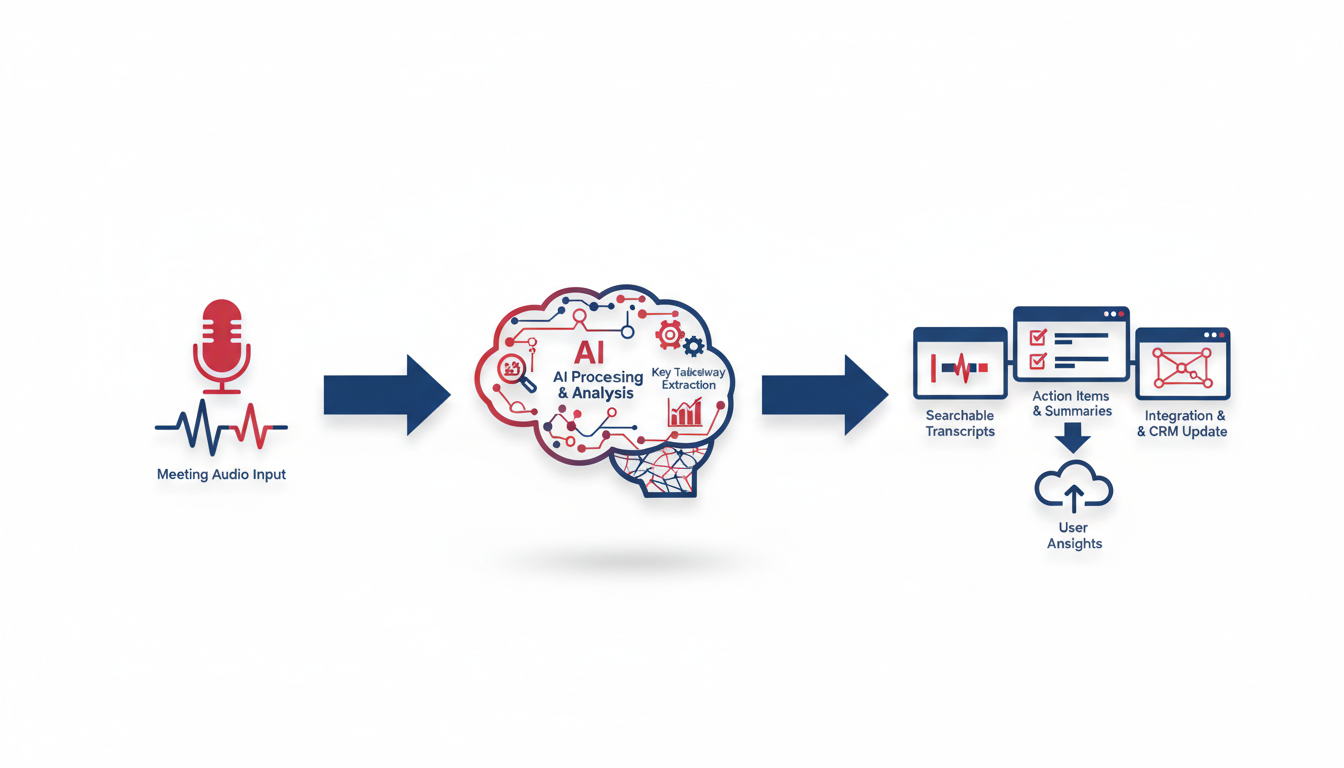
AI meeting intelligence platforms, like DeepScribe, make meetings actionable by converting spoken words into structured data. Here's how they do it, step-by-step:
Automatic Speech Recognition (ASR)
The first step in any AI meeting platform's workflow is Automatic Speech Recognition (ASR). ASR technology listens to the audio from your meetings—whether it’s from Zoom, Teams, or Meet—and converts it into text. This process is foundational for transforming verbal discussions into searchable text, ensuring nothing is lost in translation. Imagine taking real-time notes of a multi-hour meeting almost instantly—ASR makes this a reality.
Speaker Diarization
Next, we have speaker diarization, which differentiates who says what. This technology tags sections of the transcription with speaker labels, ensuring clarity and accountability in conversations. With DeepScribe, this means you can easily track who made each point or commitment, vital for follow-ups and action items.
Natural Language Processing (NLP) and Large Language Models (LLMs)
Once the transcription and speaker differentiation are complete, Natural Language Processing (NLP) and Large Language Models (LLMs) come into play. These advanced AI techniques analyze the text, extracting insights and generating concise summaries. They go beyond mere transcription—identifying key themes, sentiments, and action items. This ensures you walk away with the most crucial information highlighted, such as decisions made or tasks assigned, ready for immediate action.
Integration and Export
Finally, these platforms offer integration capabilities with tools like CRMs or project management software, turning insights into actionable tasks without missing a beat. DeepScribe allows you to export data seamlessly in formats like PDF, DOCX, or SRT, ensuring compatibility with your existing digital workflows.
Takeaway: By stitching together ASR, speaker diarization, and NLP/LLMs, platforms like DeepScribe turn meetings into organized, actionable assets rather than static records. This integration-focused approach ensures that meeting insights are not just captured but effectively utilized—transforming meetings from routine to revolutionary.
Step-by-Step: DeepScribe Workflow
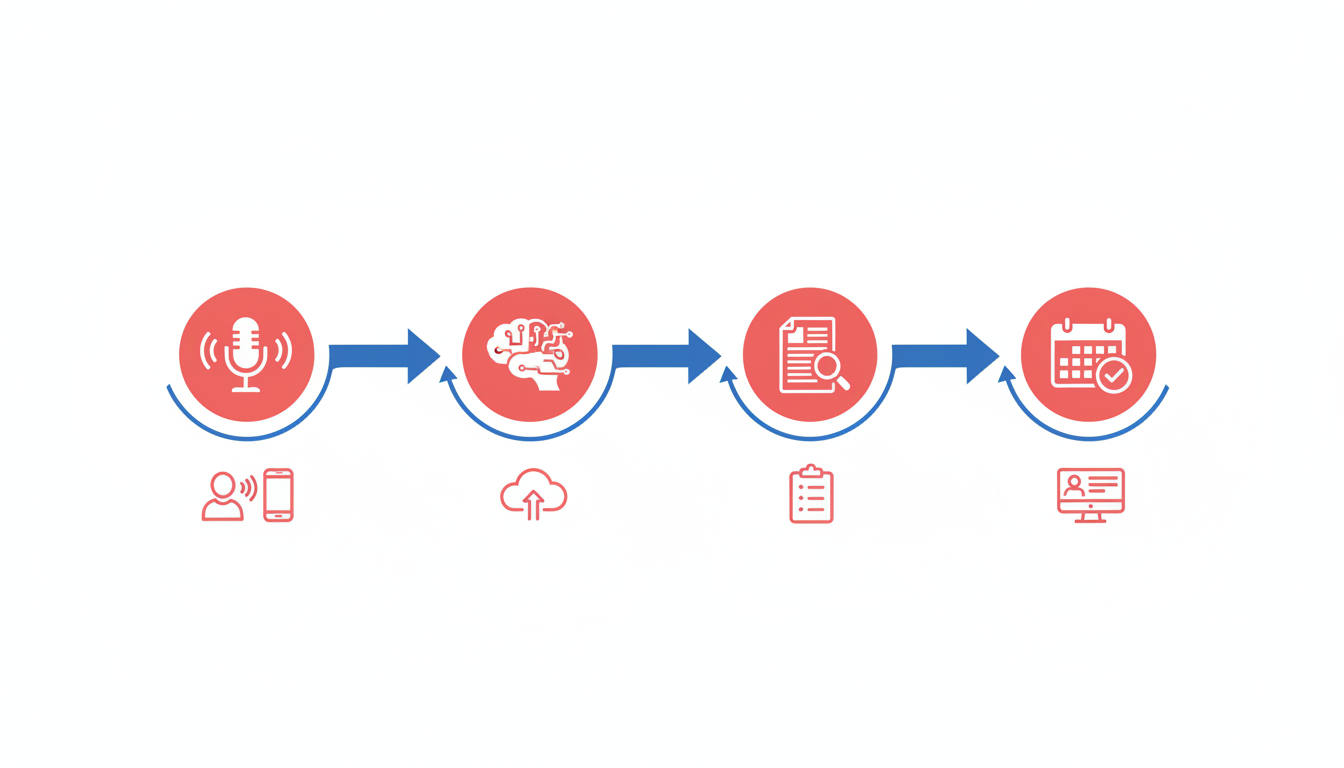
Getting started with DeepScribe to automate your meeting notes is a breeze. Let’s walk through the entire process, from setup to exporting your polished meeting insights.
Setting Up DeepScribe
First, sign up for DeepScribe and log into the platform. Once inside, you can configure the Meeting Notetaker to join your preferred meeting platform—whether it’s Zoom, Microsoft Teams, or Google Meet. By integrating your calendar, DeepScribe can auto-join meetings, ensuring you never miss capturing essential details.
Capturing Audio
During the meeting, DeepScribe captures audio seamlessly, using Automatic Speech Recognition (ASR) and Speaker Diarization to distinguish between different voices. This is crucial for accurate attribution of comments, discussions, and tasks.
Generating a Transcript
Once the meeting concludes, DeepScribe gets to work. The captured audio is transcribed into a text format in minutes, thanks to its Whisper-powered accuracy, which boasts 99% precision. This function efficiently handles accents and background noise, making the transcript a trustworthy record of the conversation.
Creating Summaries and Action Items
After transcription, DeepScribe leverages Natural Language Processing (NLP) and Large Language Models (LLMs) to generate a concise summary of the meeting. Not just that, it extracts actionable items, identifies task owners, and notes deadlines—allowing team members to proceed with clear directives.
Exporting Options
Once your transcripts and summaries are ready, DeepScribe offers flexible export options. You can export these as TXT, DOCX, PDF, SRT, or VTT files, depending on your needs and subscription plan. This versatility ensures that you can easily share documents with stakeholders or integrate them into other tools.
Integration with CRM and Project Management Tools
Perhaps one of the most valuable aspects of DeepScribe is its capacity for integration. DeepScribe can seamlessly connect with your CRM and project management software, embedding meeting intelligence directly into your workflow. This integration ensures that the insights gained from meetings are actionable and immediately useful.
Expert Insight: "Meeting intelligence turns routine meetings into strategic assets," driving better accountability and decision-making outcomes.
By reducing manual note-taking efforts, DeepScribe frees your team to focus on what truly matters: acting on insights and driving progress. Ready to see the difference? Head over to DeepScribe and start transforming your meetings into strategic assets.
Key Features to Look For in AI Meeting Platforms
When exploring AI meeting platforms, it's crucial to focus on features that genuinely enhance productivity and seamlessly integrate into your existing workflows. Let's dive into the essential elements you should consider.
1. Integration Capabilities
A standout feature you need is robust integration capabilities. Most companies require seamless integration with tools like CRMs and project management software. DeepScribe, for example, offers API/custom integrations, ensuring your meeting data bridges smoothly across platforms like Zoom, Microsoft Teams, and Google Meet. This integration is key to transforming meeting intelligence into actionable insights that drive your projects and customer interactions forward.
2. Export Formats
Exporting your meeting data in versatile formats is a non-negotiable feature. Look for platforms that provide options like PDF, DOCX, and SRT. DeepScribe excels here, offering exports in TXT on its free plan and more diverse formats such as DOCX, PDF, SRT, and VTT on premium plans. This flexibility ensures that meeting intelligence is easily sharable and usable across different applications and departments.
3. AI Meeting Assistant Features
AI meeting assistants are revolutionizing productivity by automating note-taking and task extraction. An effective platform should dramatically reduce manual note-taking. DeepScribe uses AI to capture detailed transcripts, summaries, and action items, pinpointing tasks and attributing them to the correct speaker. Through speaker diarization, it ensures each participant’s contributions are accurately captured and reflected.
Key Takeaway: To stay competitive, ensure your AI meeting platform integrates seamlessly with your preferred tools and offers rich export options to facilitate collaboration and decision-making.
By focusing on these key features—integration capabilities, export formats, and AI assistant functionalities—you'll select a meeting intelligence platform that not only enhances productivity but also fits naturally within your digital ecosystem. For more detailed insights, check out DeepScribe’s further capabilities.
Common Pitfalls and How to Avoid Them
Navigating the world of AI meeting intelligence can be tricky. Let’s address some common pitfalls and how to sidestep them effectively.
Standalone Tool Trap: Integration Issues
Key Insight: Most teams don’t want or need standalone tools; they need integration-ready solutions.
The allure of standalone meeting intelligence tools can be deceptive. Many users find that these tools fail to integrate seamlessly with existing software stacks, leading to fragmented workflows. To avoid this, always opt for platforms like DeepScribe that boast robust integration capabilities, ensuring smooth connectivity with CRMs and project management tools like Zoom, Microsoft Teams, and Google Meet. This setup minimizes operational disruptions and maximizes efficiency.
Governance and Privacy Concerns: Data Compliance
Key Insight: Prioritize platforms with strong privacy and compliance measures to mitigate risks.
Data privacy has become a priority, especially for sectors under strict regulations. A platform’s compliance with standards like SOC 2 Type II is critical. DeepScribe ensures data is safely managed with end-to-end encryption and automatic deletion after processing, effectively addressing privacy concerns. This compliance not only protects sensitive information but also boosts user confidence in AI meeting technologies (Whitecase).
Adoption Challenges and Diarization Errors
Key Insight: Simplifying user adoption and minimizing transcription errors are crucial for wide acceptance.
Adoption can falter if a platform is not user-friendly or if transcription errors occur frequently. Diarization, the process of distinguishing different speakers in transcripts, often encounters issues that can disrupt the flow of information. DeepScribe, empowered by OpenAI’s Whisper, offers highly accurate speaker detection to avoid such problems. With 99% accuracy in transcription, users experience minimal errors, enhancing trust and reliability.
Takeaway: "Meeting intelligence turns routine meetings into strategic assets," easing adoption while ensuring data security and accuracy.
To solidify your implementation, here’s a quick table summarizing essential considerations:
| Pitfall | Solution | DeepScribe Advantage |
|---|---|---|
| Standalone Tool Trap | Choose integration-ready tools | Works with Zoom, Teams, Google Meet |
| Privacy Concerns | Assess compliance standards | SOC 2 Type II, end-to-end encryption |
| Diarization Errors | Utilize accurate transcription | Whisper-powered with 99% transcription accuracy |
By understanding these pitfalls and leveraging tools like DeepScribe, you can improve meeting efficiency while maintaining data integrity and security.
Governance and Risk Management
When considering AI meeting intelligence platforms like DeepScribe, understanding privacy and compliance is crucial—especially in regulated sectors. These platforms capture, transcribe, and analyze business conversations, making data security a top priority.
Importance of Privacy and Compliance
In industries such as healthcare, finance, and law, maintaining data privacy and compliance is not just a good practice—it's a legal requirement. Companies must ensure that their AI tools comply with regulations like GDPR or HIPAA. DeepScribe, for instance, adheres to SOC 2 Type II standards, affirming its commitment to safeguarding data. Utilizing platforms that emphasize these aspects can prevent costly fines and reputational damage.
Takeaway: Choose AI meeting tools that prioritize compliance to avoid legal pitfalls.
Practical Consent and Retention Checklist
Implementing a consent policy is essential. Here’s a checklist to guide you:
- Obtain Explicit Consent: Before recording, inform participants and obtain their consent. This builds trust and adheres to legal standards.
- Define Data Retention Policies: Decide how long meeting data will be stored. Shorter retention periods reduce risk.
- Manage Data Access: Limit access to transcriptions and recordings to authorized personnel only.
- Regular Audits: Conduct audits to ensure compliance with your organization's policies and legal requirements.
This checklist can help manage risks associated with digital data handling.
End-to-End Encryption and Automatic Deletion
Security features such as end-to-end encryption are vital. This ensures that data is protected both at rest and during transmission. DeepScribe excels in this area by providing robust encryption and automatic deletion after processing, minimizing the data exposure window.
- End-to-End Encryption: Shields data from unauthorized access.
- Automatic Deletion: Automatically removes data once it's processed, reducing unnecessary storage.
By choosing platforms like DeepScribe that incorporate these security measures, organizations can reinforce their data protection strategies.
Expert Insight: "With the rise of remote work, integrating robust data protection in AI tools is not optional—it's imperative."
For first-time buyers, focusing on these governance aspects ensures a more secure and compliant adoption of AI meeting intelligence tools.
Selecting the Right AI Meeting Platform
Choosing the right AI meeting intelligence platform can make a significant difference in how your team handles meetings. Here’s a structured approach to selecting the best tool, focusing on desired features, integration capabilities, and governance.
1. Feature Checklist: What to Look For
Start by ensuring the platform covers all essential features your team needs:
- Automatic Speech Recognition (ASR): Accurately transcribe meetings in real time.
- Speaker Diarization: Differentiate between speakers for clear, organized transcripts.
- Natural Language Processing (NLP): Generate summaries and actionable insights.
- Integration Capabilities: Seamlessly connect with tools like CRM and project management software. DeepScribe excels here with integrations for Zoom, Microsoft Teams, and Google Meet.
- Export Formats: Options for TXT, DOCX, PDF, SRT, and VTT are crucial for flexibility in sharing and documentation.
2. Integration Over Standalone Tools
Integration is key. An AI meeting platform should fit smoothly into your existing tech stack, like DeepScribe’s ability to integrate with Zoom and other major platforms. This relationship ensures meetings become reusable assets across your organization's tools, improving accessibility and collaboration.
3. Privacy and Governance: Ensure Compliance
Given the focus on data privacy, it's crucial your platform is compliant with standards like SOC 2 Type II. Platforms that offer end-to-end encryption and automatic deletion after processing protect sensitive information, making them suitable for regulated sectors. DeepScribe’s strong privacy stance is an ideal example of balancing AI capabilities with robust security measures.
"Meeting intelligence turns routine meetings into strategic assets," emphasizing its role in accountability and decision-making.
4. Establishing a Rollout Plan: Pilot, Template Adoption, Metrics Measurement
- Pilot Project: Begin with a 7-day trial focusing on one meeting type. This lets you test its features in real-world scenarios.
- Template Adoption: Create standardized templates for meeting summaries and action items to ensure consistency.
- Metrics Measurement: Track metrics like reduction in manual note-taking time and improvements in action item follow-ups.
5. Table: Comparing AI Meeting Platforms
| Feature/Criteria | DeepScribe | Competitor A | Competitor B |
|---|---|---|---|
| ASR Accuracy | High (99% with Whisper) | Medium | High |
| Speaker Diarization | Advanced | Basic | Advanced |
| Integration | Zoom, Teams, Meet | Limited | Extensive |
| Export Options | TXT, DOCX, PDF, SRT, VTT | Limited | Comprehensive |
| Compliance | SOC 2 Type II, Encryption | Partial | Full |
| User Satisfaction | High | Medium | Medium |
By following this selection rubric, you’ll not only choose a platform like DeepScribe that meets your feature needs but also fits seamlessly into your workflow, ensuring compliance and maximizing efficiency.
FAQs
What is speaker diarization?
Speaker diarization is a process used by AI meeting intelligence platforms like DeepScribe to distinguish and identify different speakers in an audio or video recording. This technology helps in labeling each part of the conversation with the correct speaker, which is essential for accurate meeting transcripts. It ensures that every idea and comment is attributed to the right person, aiding in effective follow-up and decision-making. This feature is particularly beneficial in multi-speaker settings like team meetings or interviews, where attribution is key.
How do AI meeting platforms ensure privacy?
AI meeting platforms prioritize privacy and compliance to protect sensitive information. DeepScribe, for instance, employs end-to-end encryption and automatic deletion after processing to safeguard your data. These measures ensure that transcripts are secure and only accessible to authorized users. Additionally, DeepScribe is SOC 2 Type II compliant, which underscores its commitment to maintaining rigorous security standards. For teams operating in regulated sectors, these privacy features are crucial considerations when choosing an AI meeting platform.
What is a Google Meet meeting bot?
A Google Meet meeting bot is an AI tool that joins your virtual meeting to capture audio, transcribe conversations, and generate notes or summaries. Tools like DeepScribe can send a bot to platforms like Zoom, Microsoft Teams, and Google Meet, automating the note-taking process by creating detailed, speaker-labeled transcripts. This feature reduces the time spent on manual documentation and ensures that key insights and action items are not missed, facilitating smoother post-meeting follow-up.
What are automated meeting summaries?
Automated meeting summaries use AI to condense lengthy meeting discussions into concise, easy-to-digest summaries. DeepScribe’s AI not only transcribes meetings but also highlights the most important points and decisions, transforming hours of dialogue into actionable insights. This capability significantly reduces the time spent on reviewing meetings and enhances productivity by providing quick access to key outcomes and tasks. It leverages NLP and LLMs, enabling teams to stay aligned and execute efficiently on meeting outcomes.
Frequently Asked Questions
What is speaker diarization?
Speaker diarization is the process of distinguishing different speakers in audio recordings, crucial for accurate meeting transcripts.
How do AI meeting platforms ensure privacy?
AI meeting platforms ensure privacy through end-to-end encryption, SOC 2 compliance, and data deletion policies.
Can AI meeting intelligence tools integrate with CRM systems?
Yes, platforms like DeepScribe are designed to integrate with CRM systems, enhancing workflow efficiency.
Do AI meeting platforms support multilingual transcription?
Many platforms, including DeepScribe, support multilingual transcription with automatic language detection.
What export formats are available in AI meeting platforms?
Export formats typically include DOCX, PDF, SRT, VTT, with availability varying by plan.
Final Thoughts
AI meeting intelligence platforms revolutionize how we transform discussions into valuable assets. These tools efficiently generate transcripts, summaries, action items, and seamless exports or integrations. When choosing a platform, prioritize accuracy, robust integrations, and governance to enhance productivity confidently.
To experience the benefits firsthand, consider launching a 7-day pilot using DeepScribe. Start with one meeting type, select a template, and choose an export destination to see how it fits your workflow. For more guidance, check out DeepScribe's website and explore our internal how-to guides. This approach can pave the way for greater efficiency and insight in your meetings.
Written by

DeepScribe Team
Content Team
The DeepScribe content team shares insights on audio transcription and AI technology.
Related Articles
Continue reading about this topic

What Are AI Meeting Intelligence Platforms? A Simple Guide
Discover the essentials of AI meeting intelligence platforms, key features to evaluate, and common pitfalls. Learn through a DeepScribe workflow example.

DeepScribe Team
March 6, 2026 · 23 min read · 4,508 words